Navigate through spaces
Search
K
📑
End User Guide
Logging in to Kron PAM
Registering as a New User
Changing the Interface Language
Logging in with SSH Key
Kron PAM Session Manager
Connecting with RDP/VNC Proxy
HTTP/HTTPS Proxy
Connection Reservation
Data Access Manager
Password Vault
Multi-Factor Authentication (MFA)
Approval Management for End Users
TACACS+ Access Manager
RADIUS 802.1x Configuration
Kron PAM Secure Remote Access
🖥️
Desktop Client User Guide
Setting Up Kron PAM Desktop Client
Changing the Kron PAM Desktop Client Language and Tabbed View Usage
Configuring a Server
HTTP Proxy Configuration on the Kron PAM Desktop Client
Using HTTP Proxy in SSL/TLS Mode
Entering the Server Information for HTTP Proxy
Making RDP/SSH/HTTP Sessions via Kron PAM Desktop Client
Connect to Target Device Feature on the Kron PAM Desktop Client
Searching Devices in the Kron PAM Desktop Client
Password Vault Support in the Kron PAM Desktop Client
Connect to the Target Device over the Check Out Password Option
Categorizing Frequently Used Devices
Logging Out
Starting Kron PAM Desktop Client from Command Line
Windows Authentication Feature on Kron PAM Desktop Client
SAML Integration on Kron PAM Desktop Client
Detailed Log Mode for Kron PAM Desktop Client
📱
Mobile Client Application User Guide
Getting Started with Kron PAM Mobile Client Application
Multi-Factor Authentication
Two-Factor Authorization
Approval Management
Password Management
Docs powered by
Archbee
Desktop Client User Guide
Searching Devices in the Kron PAM Desktop Client
1 min
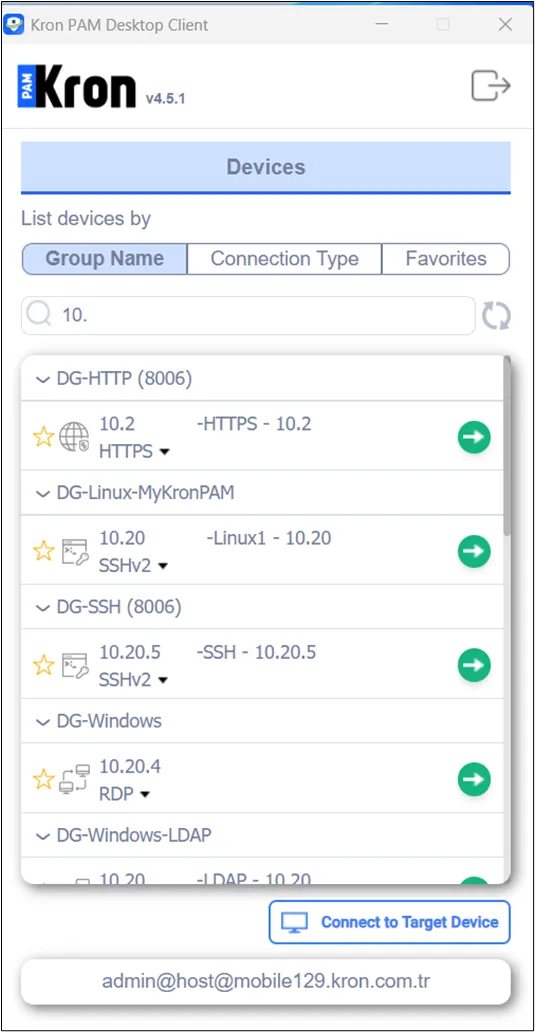
To search for devices:
Log in to the
Kron PAM
Desktop Client and open the Devices
tab.
Search for the device in the search box.
Search for your the devices
PREVIOUS
Connect to Target Device Feature on the Kron PAM Desktop Client
NEXT
Password Vault Support in the Kron PAM Desktop Client
Docs powered by
Archbee
Docs powered by
Archbee