Detailed Log Mode for Kron PAM Desktop Client
2 min
Kron PAM Desktop Client has the option to show detailed logs (including HTTP requests, exceptions, inputs and outputs, etc) by entering one of the following parameters in the target field of the Kron PAM executable file:
- error
- warn
- info
- verbose
- debug
The abovementioned parameters are ordered starting from the least-detailed log mode to the most detailed. To collect all logs, the debug parameter should be selected by entering -log=debug at the end of the target field. Regardless of your parameter choice, the log files are stored with the YYYY-MM-DD.log format under:
- Windows: C:\Users\<username>\AppData\Roaming\Krontech Single-Connect\logs
- Mac: /Users/{user}/Library/Application Support/Krontech Single-Connect/logs
- Linux: /home/product/.config/Krontech Single-Connect/logs
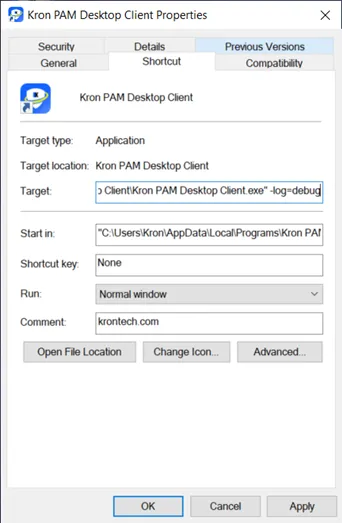
Enabling detailed log mode on Kron PAM Desktop Client