Changing RDP Session Settings
You can change some of the RDP connection parameters on the clipboard Settings page after establishing an RDP connection. When restarted, the new session starts based on the updated parameters.
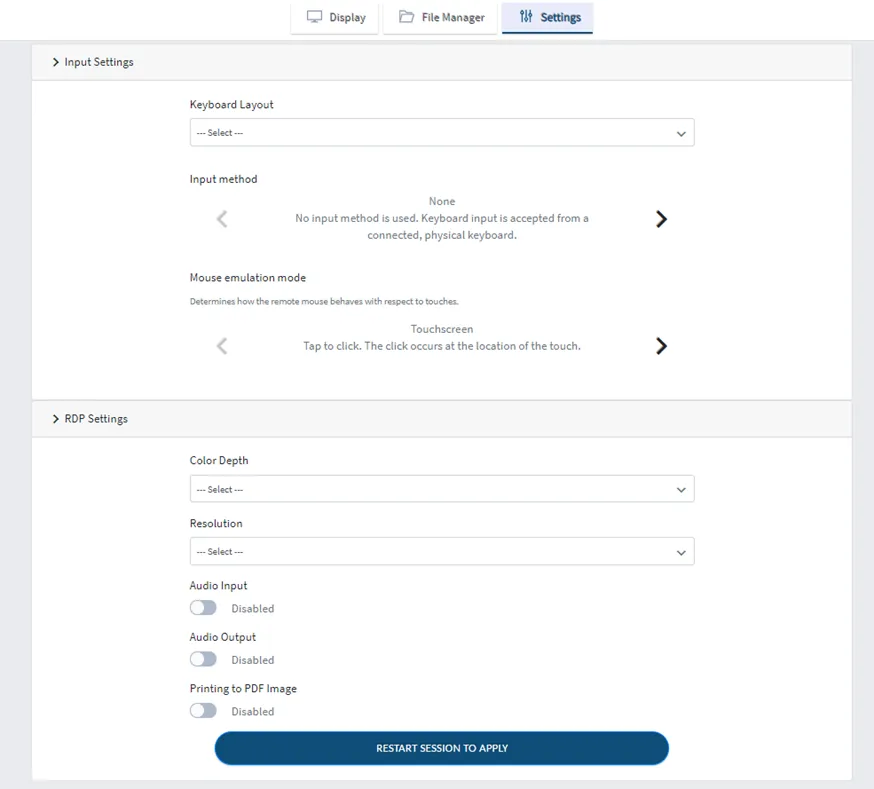
Screen resolution, keyboard layout, and language settings do not persist by default. This is especially noticeable in Remote Privileged Access Management (RPAM) sessions, where these settings reset each time you refresh the portal link or open it in a new browser. If you want these settings to persist automatically, contact your administrator. Administrators can configure persistent, user-specific default settings that take precedence over the device's default settings. These settings apply to RDP sessions started from the Kron PAM Desktop Client Application, the Web GUI, and the RPAM Portal.