Translating...
Kron PAM Mobile Client Application allows users to manage all passwords and approvals using a single Kron PAM Mobile Client Application, so the user doesn’t need to open his/her email to approve/reject any command, connection, or password request.
To use approval management in the Kron PAM Mobile Client Application, the user should first log in to the Kron PAM server and then follow the steps below:
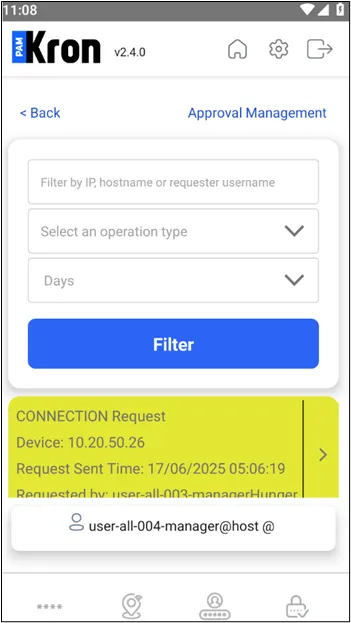
- Open the Approval Management tab on the Kron PAM Mobile Client Application. A few search options will appear. The user can search:
- by the keyword such as IP, hostname, and the requester’s name,
- by the type of approval request
- By the time interval
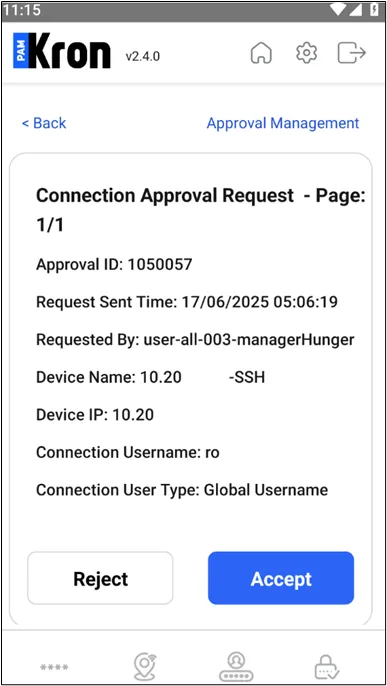
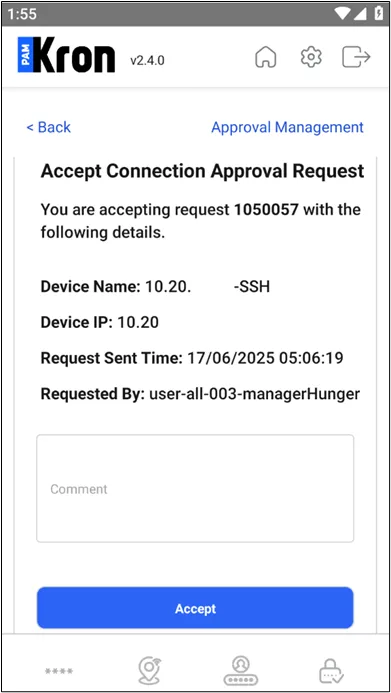
- Once the user gets the search results, the user should click the Details button, which is located on the rightmost side of the approval request, to decide to Approve or Reject.
The notifications related to approval requests are sent to smartphones via the Firebase service. On supported devices, notifications are shown regardless of app state — in foreground, background, or when the device is locked. The Firebase configurations are stored in mobile-api-default.properties under /pam/docker-mgmt/config-repo, encrypted.
Select the desired option for the approval request.