Using MFA for SSH Proxy
Single Connect’s built-in MFA can be used as an enhanced security level for SSH Proxy.
When the user opens an SSH Client (Putty, SecureCRT, etc.), the user is asked for their Single Connect credentials to connect to the SSH Proxy. After the successful credential login, if MFA is activated for SSH Proxy, the user is asked for an MFA token.
To enable MFA for SSH Proxy:
- Pre-requisite: Admin and the users have the QR code, installed the Single Connect mobile app, scanned the QR code with the mobile app, and OTP is enabled for the user group which will use MFA for SSH Proxy. (See sections Sending MFA QR Codes to Users, Creating a Connection Between Single Connect and the Single Connect Mobile Application, Enabling One-Time Password (OTP) )
- Establish an SSH connection to Single Connect as the root user
- Edit the “nsso.properties” file with the command below: vi /u01/nssoapp/conf/nsso.properties Check the configuration file to see if the parameter below is already configured. If not, add the lines below. If there is a hash ( # ) sign in front of the parameters, delete the hash ( # ) sign to activate the parameter. If the parameter value is false, change it to true. To type or add anything in the vi editor, first press the Insert button on the keyboard, then type in the necessary line. Press Esc to exit typing mode. To save the file press Esc, then colon ( : ), then type in “wq!”, and press enter. If you don’t want to save the changes on the file, press Esc, then colon ( : ), then type in “q!”, and press Enter. nsso.connection.initial.otp.enabled=true nsso.connection.initial.otp.cache.enabled=true nsso.connection.initial.otp.cache.sec=xxx (second)
- Restart the SSH Proxy with the command below systemctl restart nssoapp
After these steps, OTP will be required after the SSH Proxy log in.
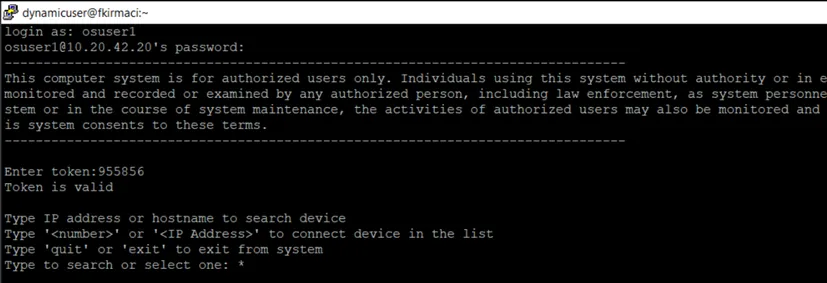
Enabling MFA to SSH Proxy