Enabling One-Time Password (OTP)
There are two different MFA use cases:
- Using MFA to log in to the Single Connect Web GUI.
- Using MFA for SSH/RDP Connections.
For both use cases, OTP needs to be enabled at a user group level. To use MFA with the Single Connect Web GUI, at least one of the user groups needs to be enabled. It’s not relevant which user group is enabled as, regardless of the user group, MFA will be enabled for all users.
The second application of OTP is to the activate MFA feature on a user group, to establish SSH or RDP connections to a device by using the MFA feature. To enable OTP for a user group:
- Navigate to Administration > 2FA Provisioning.
- Open the User Group Management tab.
- Click the Enable OTP button for the desired user group (the whole row will turn green when OTP is enabled)
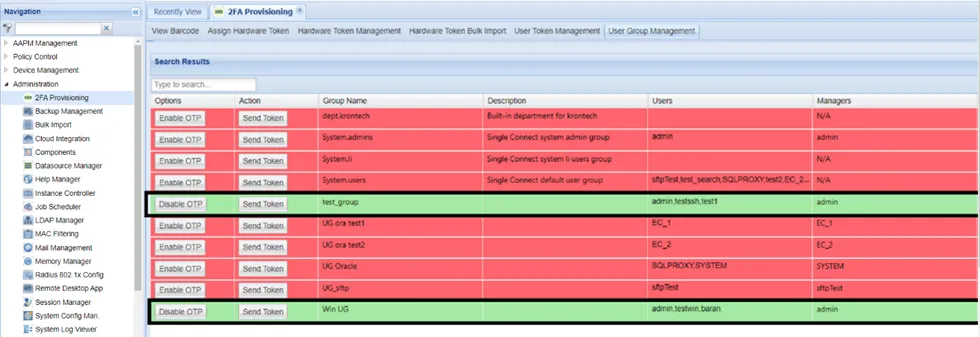
Enabling OTP for a User Group