DAM Object Explorer
The DAM Object Explorer presents the hierarchical structure of every database that is routed through Kron DAM’s SQL Proxy. After the first successful metadata synchronization, connected databases are listed as root nodes, while their schemas, tables, and other child objects appear beneath them. The explorer, therefore, serves as a read-only navigator that allows administrators to confirm that metadata collection is active and to review the layout of each database without issuing any queries.
A device entry is created in Devices → Inventory and assigned to an appropriate device group.
Within the Edit Database dialogue of that device, the target database instance is described:
- Hostname / IP, service name (or SID), and access protocol are entered.
- A credential pair (username/password) that the SQL Proxy will use for metadata access is supplied.
The proxy bind port is specified in Device Properties by setting sql.proxy.bind.port (or by selecting Auto Assign). This port is required for the out-of-band metadata channel.
Once the device, database, and bind port have been saved, Kron DAM launches a background synchronization task. When it completes, the DB Object Explorer automatically displays the new database entry.
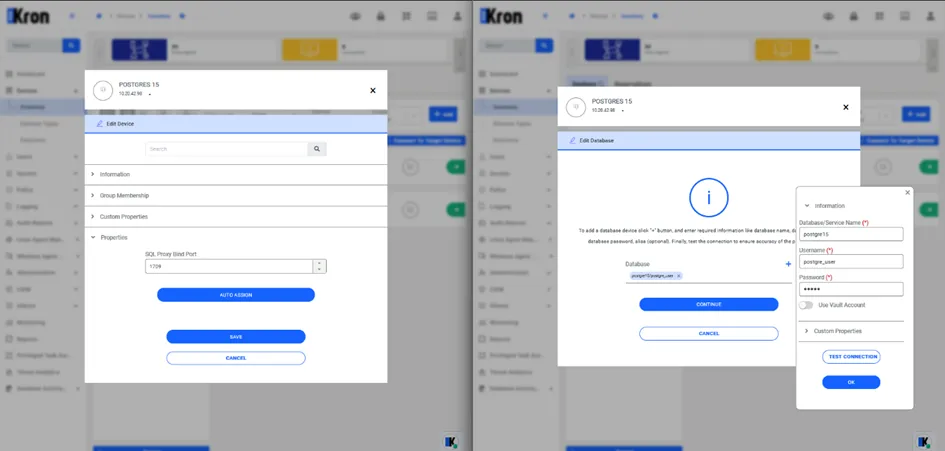
Insert UI Step: SQL Proxy Bind Port configuration under Device Properties