DAM Object Explorer Usage
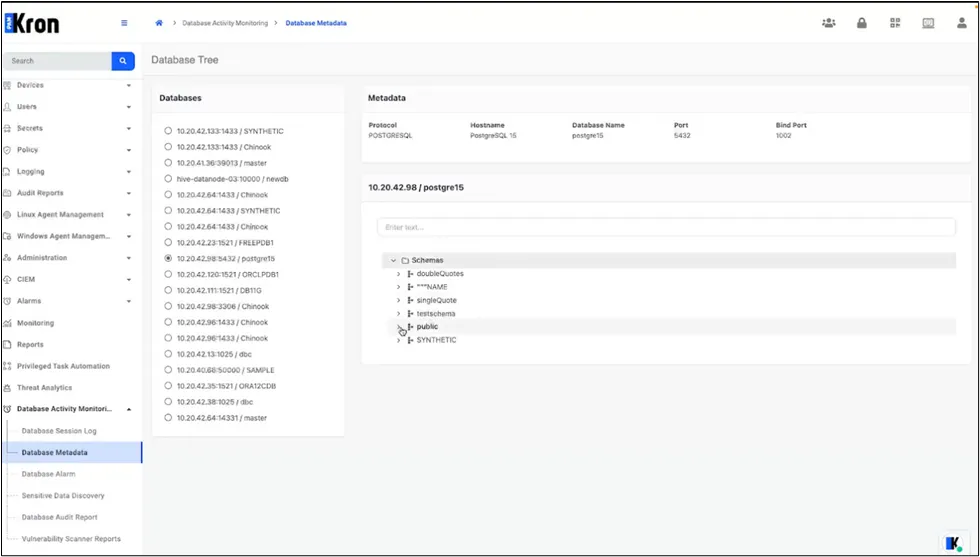
On opening Database Activity Monitoring → DAM Object Explorer, the screen is divided into a tree panel on the left and a metadata panel on the right.
Database Tree
- Each root node is labelled <IP>:<Port> / <DatabaseName>.
- Child nodes represent schemas; grandchild nodes list tables, views, or partitions.
- Folder-style icons distinguish databases, schemas, and objects.
- Nodes are expanded or collapsed through the chevron (▸ / ▾) or a double-click.
Metadata Panel: Selecting a node refreshes the panel with a single-line summary that includes Protocol, Hostname, Database Name, Port, and Bind Port.
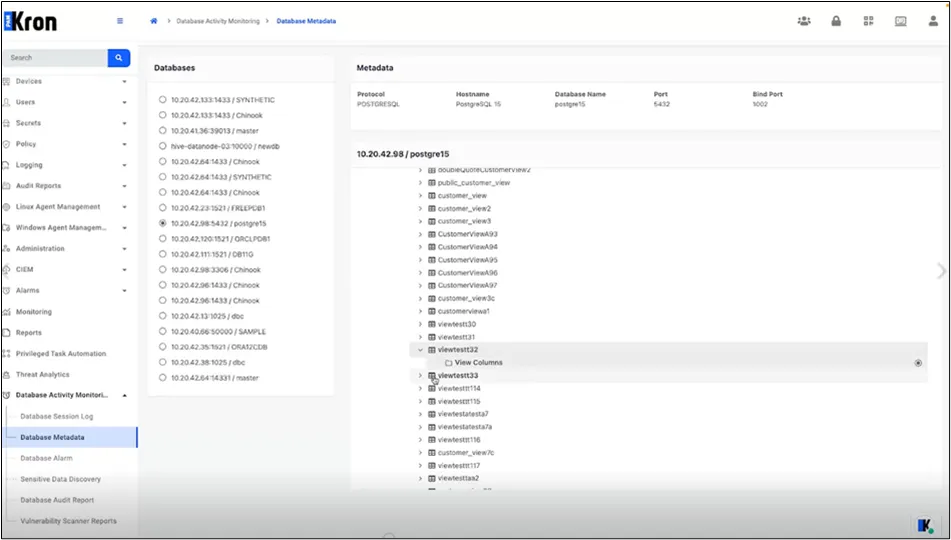
When a schema or table is chosen, an inline modal (or expandable row) reveals additional attributes such as column names, data types, or creation timestamps. All content is rendered in read-only mode; no configuration changes are performed from this interface.
If a selected database does not expose metadata, the tree remains empty, and the metadata panel displays an informational banner:
This database does not support metadata access. Therefore, child objects cannot be displayed.