Connecting with the Kron DAM SQL Proxy
1 min
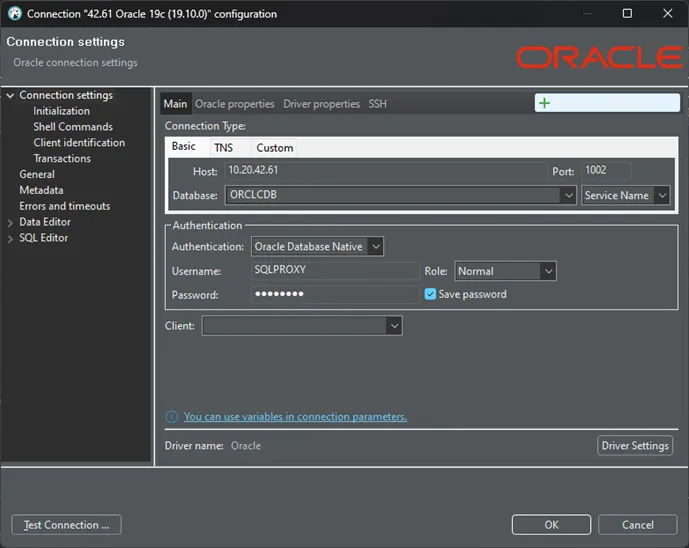
There are different kinds of SQLs supported by Kron DAM. The port number is the identifier of the connection to the Database via Kron DAM SQL Proxy. To establish a connection using SQL Proxy:
- Utilize an SQL client (such as DBeaver, DataGrip, SQL Workbench, etc.)
- Initiate a new connection in the SQL client, selecting the type of database added to Kron DAM (e.g., if Oracle was added to Kron DAM, select an Oracle-type connection).
- Enter the username and password for the device you entered in Kron PAM into the connection screen of your SQL client.
- Enter the SQL proxy port number, specifically assigned in Kron DAM, into the Port field.
- Input the IP number of Kron DAM into the Host field.
- Enter the database name you entered in Kron DAM into the Service Name field.
- Establish the connection.
For MSSQL DB Connections some SQL Clients could give connection errors. To solve this please change the sslProtocol to TLSv1.2