Configuring Kron DAM for Read-Only Access
1 min
To enforce read-only and read-write modes for specific users or user groups, add the following properties in the Kron DAM GUI. These properties are set under Device Properties.
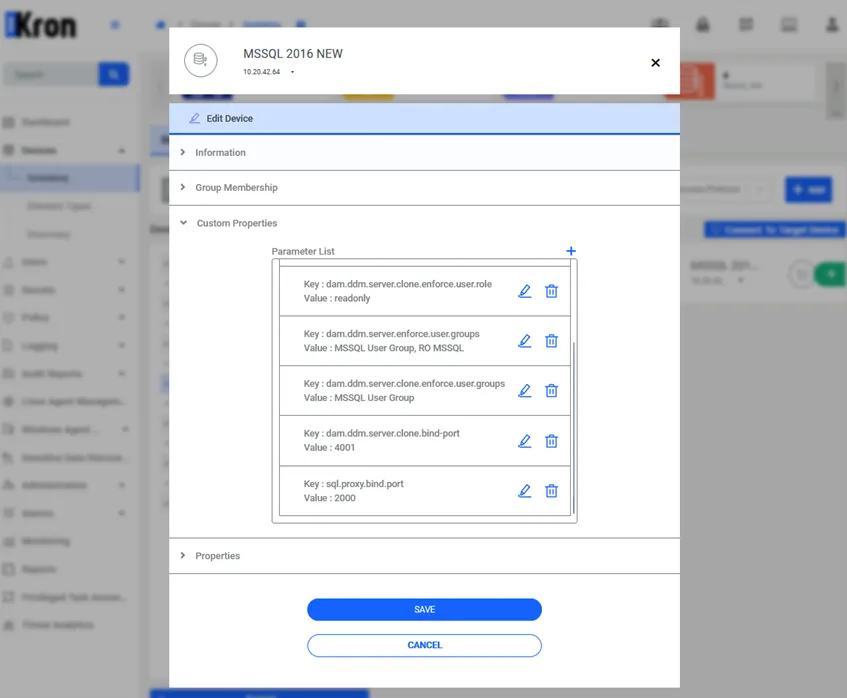
- dam.ddm.server.clone.enforce.user.role: readonly
- Enforces read-only behavior on the cloned port.
- dam.ddm.server.enforce.user.groups: UG1,UG2
- Defines the user groups forced to connect via the main (read-write) port. All users outside UG1,UG2 are not allowed to connect on the read-write port.
- dam.ddm.server.clone.bind-port: 4001
- The port number for read-only connections (the “cloned” port).
- dam.ddm.server.clone.enforce.user.groups: UG3,UG4
- Defines the user groups forced to connect via the read-only port. All users outside UG3,UG4 are not allowed to connect on the read-only port.