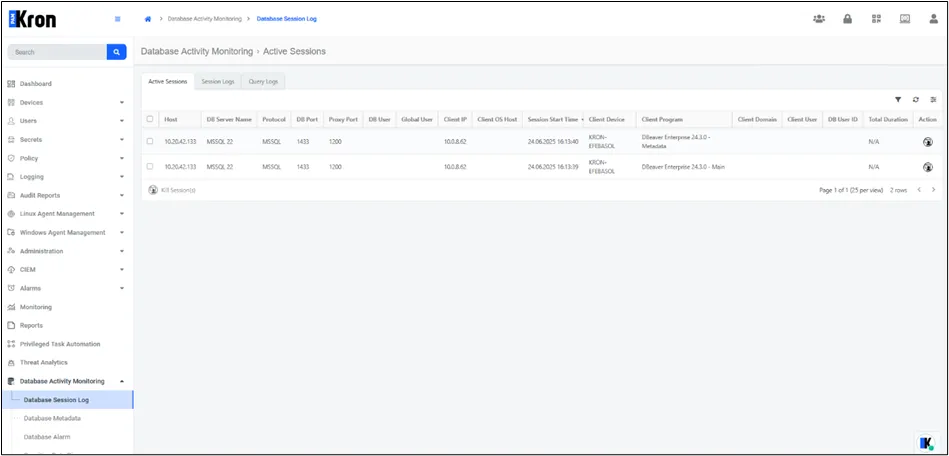
Active Sessions
The Active Sessions table, accessible from Database Activity Monitoring > Database Session Log > Active Sessions, shows currently open database sessions routed through the SQL Proxy. This screen is useful for identifying live user activities and monitoring unauthorized or unexpected connections.
Fields | Description |
|---|---|
Host | IP address of the target database device. |
DB Server Name | Name or label of the connected server. |
Protocol | Database protocol (e.g., Oracle, MSSQL, PostgreSQL). |
DB Port | Original database port. |
Proxy Port | The SQL Proxy port is set for this session. |
DB User | The user credentials are used at the database level. |
Global User | The Kron DAM user is associated with the session. |
Client IP | IP address of the connecting client. |
Client OS Host | Hostname of the client machine. This field is supported only for Oracle databases. |
Session Start Time | Timestamp of when the session started. |
Session End Time | Timestamp of when the session ended. |
Client Device | The name or identifier of the client device used. |
Client Program | The application used for the connection (e.g., DBeaver, DataGrip). |
Client Domain | Domain name of the client machine. |
Client User | Username from the client machine. |
DB User ID | System-assigned ID for the database user. |
Total Duration | Duration of the session. |
Action | Option for viewing all SQL queries run during that session in a time-ordered list, including command type, exact query text, and other metadata. |