Two Factor Authorization
Single Connect can be used for Two-Factor Authorization. System admin configures and tests Two-Factor Authentication definitions for location confirmation during deployment. To use these features, you should log in to your Single Connect. Otherwise, it will redirect you to the login page before it lets you generate any token or confirm any request. Single Connect Two Factor Authorization is available in Geo-Fencing mode with the mobile application.
Geo-Fencing
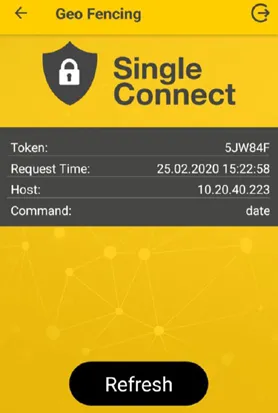
On Single Connect, you can add restrictions to black key commands, such as location confirmation. To confirm a user’s location, you use Geo-Fencing. This allows users to be authorized only when they are located in the pre-selected location. In case a user needs authorization through location conformation, follow the steps below:
- After the initial setup, select Geo-Fencing, and you will see the token notification.
- Tap on the notification and then on OK to approve the command.