Secret Data Vault
7 min
The Single Connect Secret Data Vault enables storing User Credentials, SSH Keys, SSL Keys, and other sensitive data.
Prerequisite: You must have the necessary permissions to perform the following operations. Contact your administrator.
Creating Secret Data
- Navigate to Secret Data Vault > Secret Data Vault Accounts.
- Enter the following required information: Secret Name, Description, Group Name, IP Address.
- Select Secret Type.
- Enter Secret Data.
- Click Save.
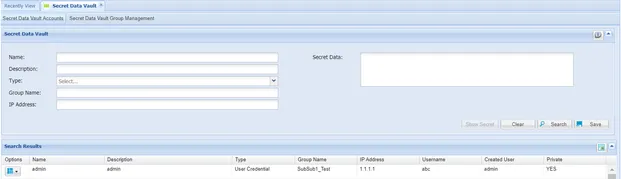
Secret Data Vault Accounts
Showing/Editing Secret Data Definition
- Navigate to Secret Data Vault > Secret Data Vault Accounts.
- Select a secret data record and click the secret data Options button to edit or show secret.
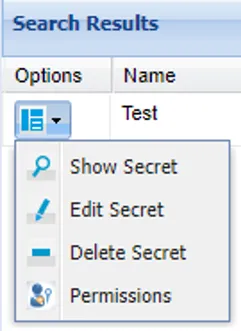
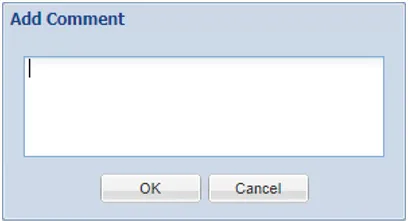
- Select the Show Secret option to show secret data and enter the reason to display the data.
- After showing secret data, the Secret Data area is editable.
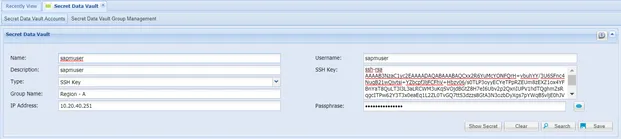
- Edit the secret data and click Save to change the secret data.
- Select the Edit Secret option illustrated in step 2 to edit the Name, Description, Type, IP Address fields.
Managing Secret Data Vault Groups
Single Connect users can create their own secret data vault groups and add their accounts under groups. Permission privileges can be assigned through the group.
- Navigate to Secret Data Vault.
- Open the Secret Data Vault Group Management.
- Fill in the Group Name and Description fields (Groups can be added under the parent group).
- Click Save.
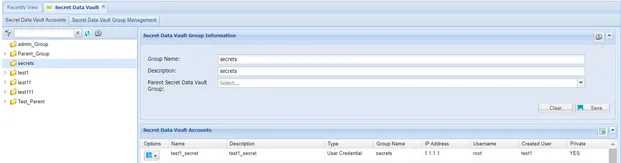
Manage Secret Data Vault Groups
Users are fully authorized on the groups they create. Secret Data records are added to the created groups, and these groups can be shared with different user groups. There are two types of permissions in Secret Data Vault accounts: groups and subgroups can be given FULL CONTROL or READ ONLY permission to access Secret Data.
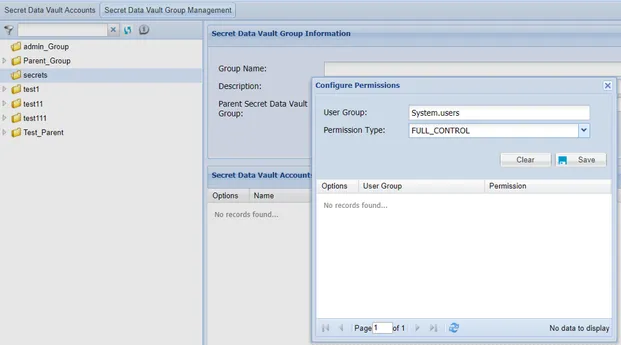
Secret Data Vault Group Permissions
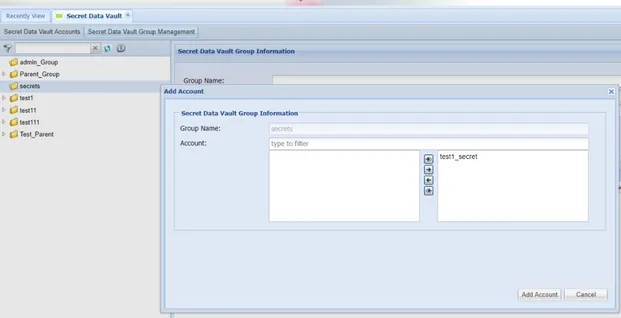
Add an account to the Secret Data Vault Group.