Password Reservation for Future Dates
3 min
You can reserve password retrieval for a SAPM Account for a future date. For future date reservations, follow the steps below:
- Navigate to SAPM Management > SAPM Management.
- Open the SAPM Accounts tab.
- Click the Search button to search for the accounts.
- Click the Options button of the account of which password will be reserved.
- Select Password Reservation from the drop-down menu.
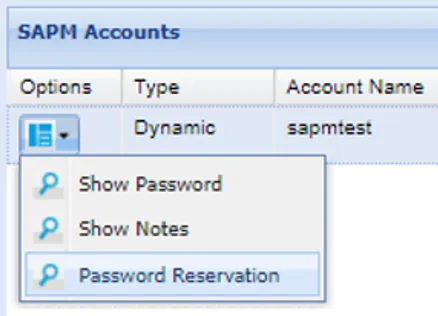
- From the pop-up, enter Start Time, Reservation Duration, Reminder, Comments, and First Part and Second Part users if Split Password applies to the account.
- Click Reserve, and the reservation will be listed in the Search Results.
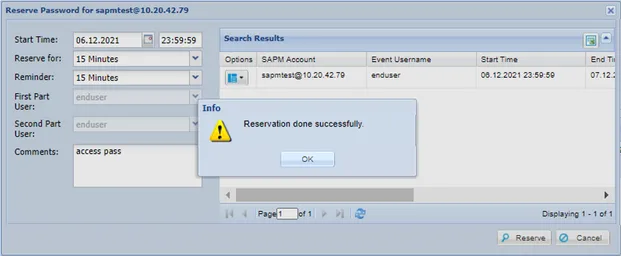
Password Reservation Pop-Up
- If the user is subject to one or two-level approval, the approver(s) must approve the reservation before the user can access the password.
- If all approvals are completed, the user receives a reminder e-mail at the established reminder time, along with the password e-mail at the reservation time.
- You can search for past and future reservations in the Reservation tab.
Deleting Reservations
To delete reservations:
- Click the Options button next to the reservation
- Select Delete reservation
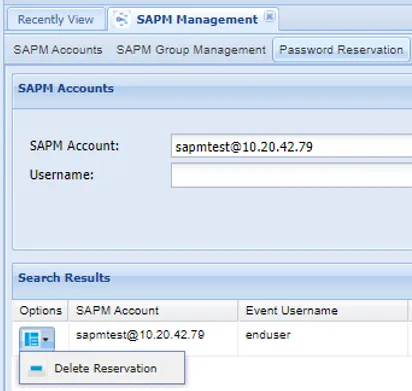
Pasword Reservation Tab