Adding Parsers
Parameter-Driven Parser Templates
The platform allows you to convert any parser function into a reusable, parameter-driven template. Instead of requiring users to understand parsing syntax or VRL structure, you can define dynamic parameters using the $parameterN$ format. Each parameter you define becomes an editable field in the UI, enabling users to configure complex parsing logic simply by entering values.
There is no limit to the number of parameters you can create. For example:
Each of these becomes an editable input field when the template is used.
You can also add descriptions for each parameter by defining inline comments under the template using the #parameterN format. These explanations appear in the UI to guide the user when filling out the form fields. For example:
By combining parameter placeholders and descriptive comments, you can create fully dynamic, user-friendly parser templates. Once created, templates can be saved in the library and reused across pipelines without requiring any knowledge of the underlying syntax.
File Upload Requirements
- Uploaded files must have a .conf extension. Only configuration files ending with this extension are accepted to ensure correct parsing and format consistency.
- Files may be uploaded even if they contain no parameters. Empty or placeholder configuration files are supported.
- Multiple .conf files can be uploaded at once. This allows batch loading and streamlined configuration during deployment or updates.
How to Upload a File
- Navigate to Library.
- Click Template.
- Click the Add Template button in the top-right corner.
- Select Parser Template.
- Drop your .conf file(s) into the grey upload zone, or click the zone to browse.
- Click Upload.
Example Template
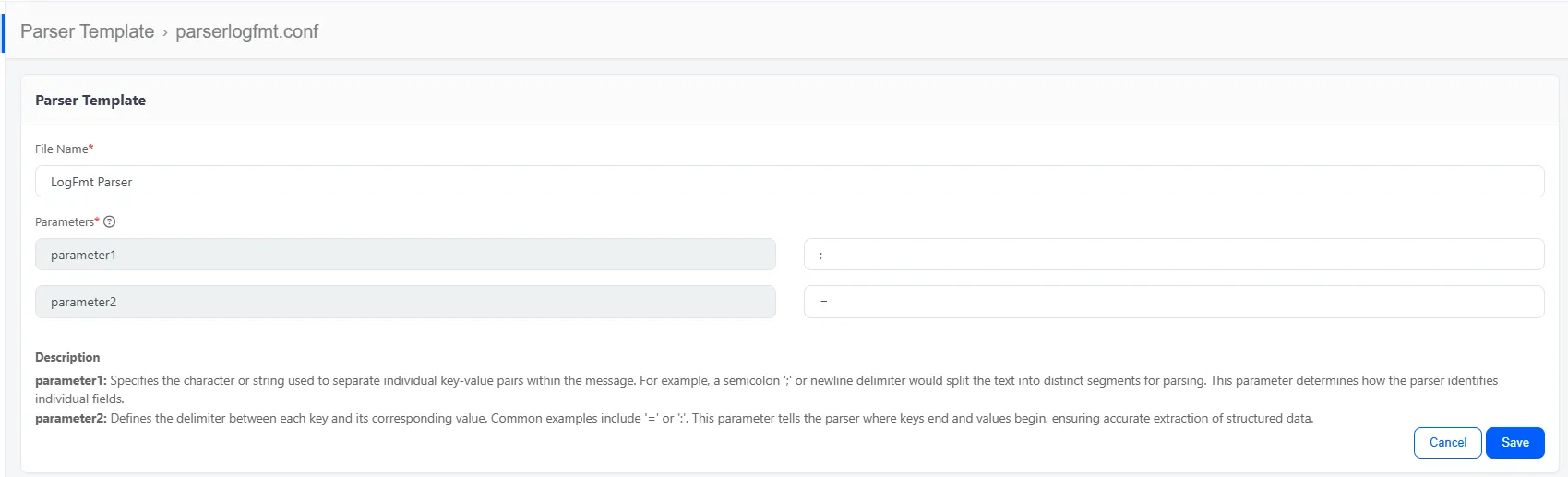
Parameter Descriptions
This example should look like this in a text editor:

This uploaded file will look like this: