Future Date Reservation
3 min
Password retrieval for an SAPM Account can be reserved for a future date. To set up future date reservations:
- Navigate to SAPM Management > SAPM Management.
- Open the SAPM Accounts tab.
- Click the Search button to search for the accounts.
- Click the Options button of the account the password will be reserved for.
- Select Password Reservation from the drop-down menu.
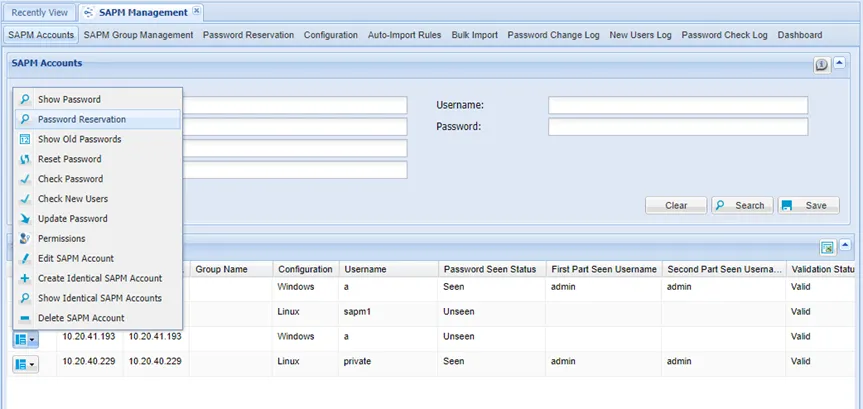
Password Reservation Option
- Specify the Start Time, Reservation Duration, Reminder, Comments, and First part and Second Part users (if Split Password applies to the account)
- Click Reserve.
- The reservation will appear in the Search Results.
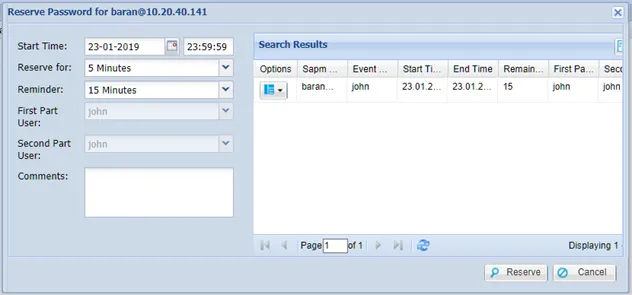
Password Reservation Pop-up Window
If one or two-level approval applies to the user, the reservation request should be approved before the user gets the password.
If all approvals are completed, the user gets a reminder email at the predetermined reminder time, and receives the password email at the reserved time.
Past and future reservations can be searched on the “Reservation” tab. To delete future reservations:
Click the Options button next to the reservation.
- Select Delete reservation.
Password Reservation works only when the SAPM_PasswordReservationJob job is triggered periodically.