Split Password Feature
3 min
In order to secure the two-part approval process, tan SAPM account password can be split in two and each part retrieved by different users. After placing the users in different user groups, follow these steps:
- Navigate to Device Management > Device Groups.
- Open the Device Group Realms tab.
- Create the Device Group Realm between the user groups and the device group containing the target device.
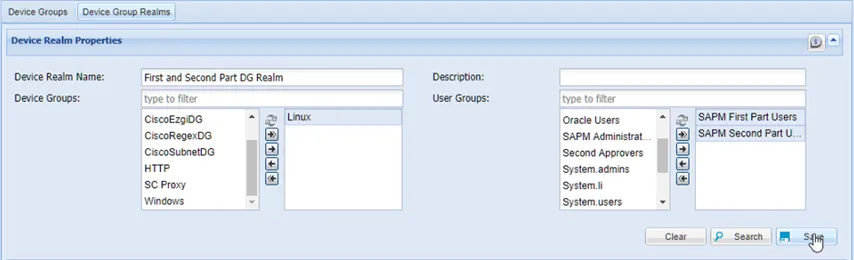
Device Group Realm for User Groups
- Navigate to SAPM Management > SAPM Management.
- Search for the accounts.
- Click the SAPM account Options button.
- Select Permissions to open the permissions pop-up window.
- Define the READ_ONLY_FIRST_PART permission type for the user group that will receive the first part of the password.
- Define the READ_ONLY_SECOND_PART permission type for the user group that will receive the second part of the password.
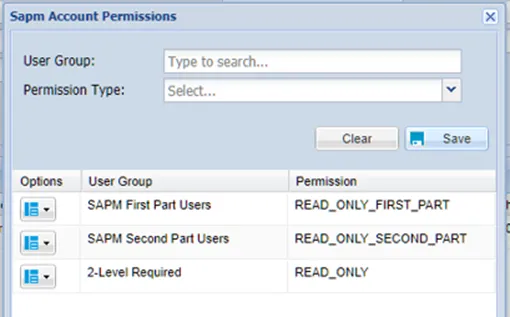
SAPM Permissions Set Up for User Groups
- Close the permissions pop-up window.
- Navigate to Policy Control > Portal Functions.
- Create a portal realm with the SAPM Management function group for both user groups.
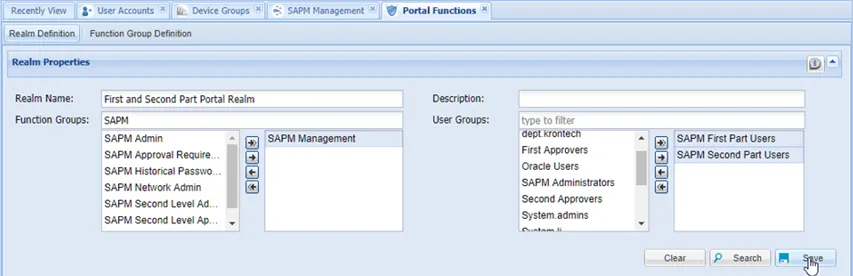
Portal Functions Realm for the user groups
After completing these steps, the users log in and retrieve their parts of the password from the SAPM Management section, just like with a normal password retrieval. They can log in to the target system using the SAPM username and the password combined in the correct order.
If one or two-level approval applies to the user, the user will receive the password part via email, once the approval process is completed.