Desktop Client Configuration
3 min
The second way to use HTTP Proxy is through Single Connect Desktop Client. The Single Connect Desktop Client can be used to establish an HTTP connection. This section describes how to configure the Desktop Client for HTTP Proxy and use the Desktop Client to establish an HTTP connection.
Using the Single Connect Desktop Client allows using Single Connect without changing any browser or computer proxy settings. You can download the desktop client from the Single Connect Web GUI login page.
To configure the Desktop Client for HTTP connection:
- Open the Single Connect web GUI in an internet browser and click the Download Desktop Client option on the login page.
- Install the client by following the instructions.
- Open the desktop client, click Connections, and then click Add. Enter the Single Connect IP address and the Single Connect UI port number (the default port is 443). The Use SSL box needs to be checked, then click Save.
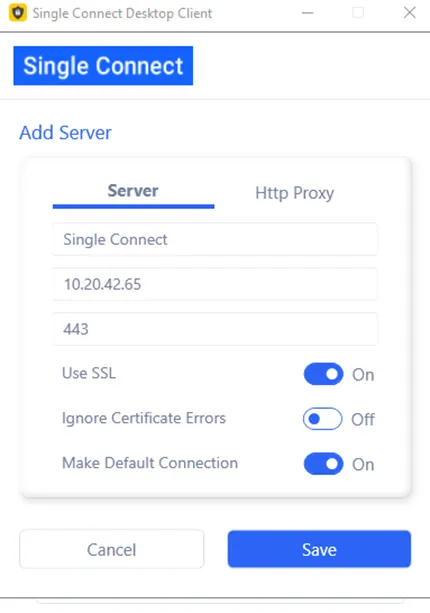
Single Connect Desktop Client Connection Interface
- Enter the Single Connect Username and Password. Select the Single Connect IP address from the Server section and click Login.
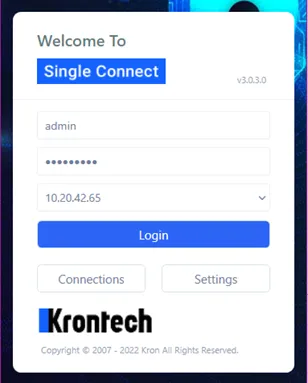
Single Connect log in via Desktop Client
- The Single Connect device group tab will be displayed. All device groups and devices that the user is allowed to access will be listed. Choose an HTTP/HTTPS device and double-click to open an HTTP or HTTPS session.
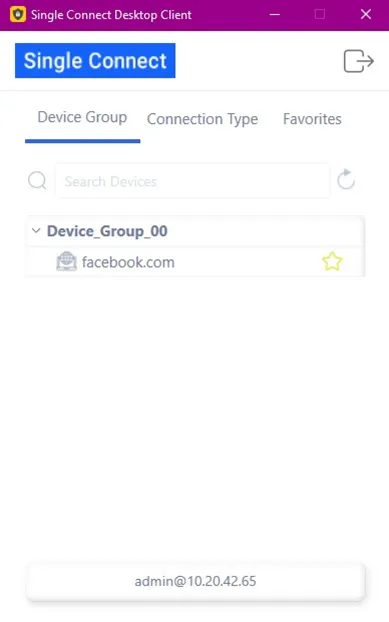
Double-click the Web Server IP address to open up an HTTP/HTTPS session