Authenticating to HTTP Proxy
3 min
To use HTTP Proxy through a web browser, you need to make the required configurations described in the Web Browser Configurations for HTTP Proxy in the web browser. After making these configurations, requests (and responses) to all web pages to be accessed via the corresponding web browser are routed through the HTTP proxy.
If an HTTP proxy is configured, the HTTP Proxy publishes an authentication page over the HTTPS protocol. At the beginning of the session started by the client browser, the following authentication page always returns in response to the request.
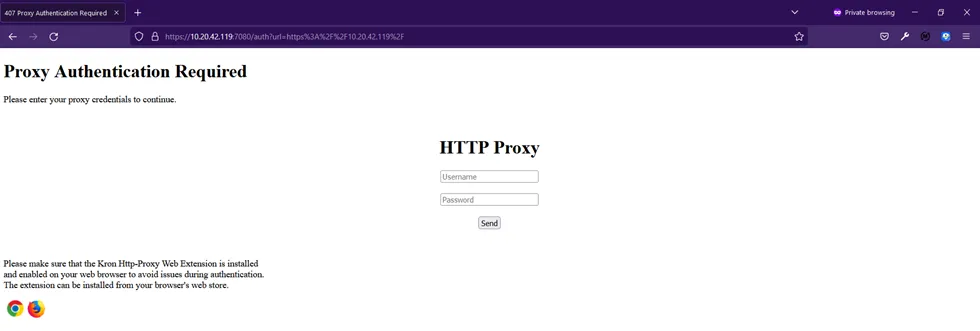
- Open the web browser on the proxy configured endpoint.
- Download and install the related browser extension at the left bottom corner to establish enhanced security.
- Then activate the extension by clicking the Krontech icon.
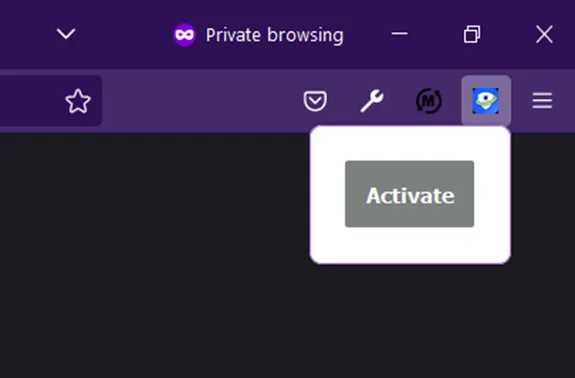
- Re-open the browser and log in with your credential.
- If you encounter an issue during the installation of the browser extension, HTTP Proxy can be configured to be used before with manual token operation. To revert back to that legacy authentication method edit the http-proxy.properties file with: http.proxy.auto.submit.session.id.on.login=false
- Also, you can edit the text prompted on the authentication page with: http.proxy.login.screen.message= <Some guiding information>