Web Browser Configuration
2 min
The first way to use the HTTP Proxy is through a web browser. All web browsers support the HTTP Proxy functionality, however, we recommend Mozilla Firefox, since its proxy configurations can be done without effecting the computer's proxy settings. Other web browsers use the operating system’s Proxy settings, so that, in order to use them, the operating system proxy settings need to be configured for HTTP Proxy.
Mozilla Firefox
The Mozilla Firefox web browser can be configured with the following steps:
- Open Settings > Network Settings.
- In Proxy Settings, select Manual Proxy Configuration.
- In the HTTP Proxy field enter the Single Connect IP address or URL.
- In the Port field, enter the Single Connect port (Single Connect’s default HTTP/S port is 7080)
- Click the Use this proxy server for all protocols checkbox and click OK.
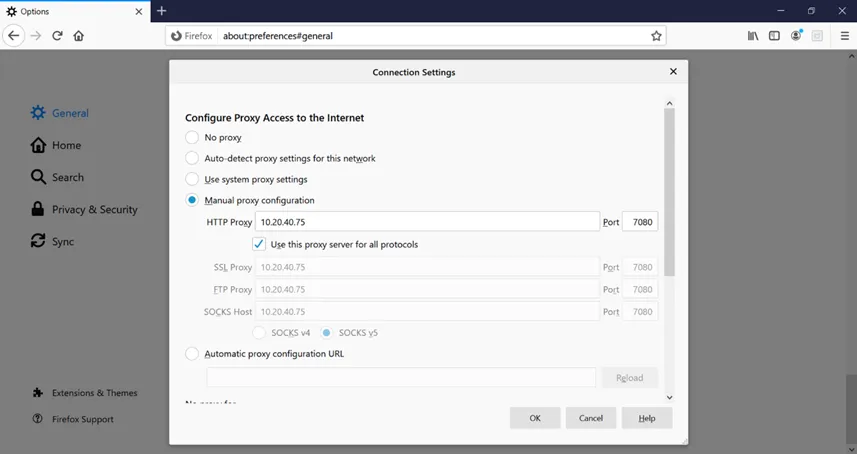
HTTP Proxy - Mozilla Firefox Settings
Other Web Browsers
Instead of Firefox, other web browsers can also be used as HTTP Proxies. To use other browsers, the Microsoft Windows proxy settings need to be changed. To configure other web browsers as HTTP Proxy:
- Open the Microsoft Windows Settings.
- Search for Proxy and, click the Change Proxy Settings result link.
- Scroll down to find Manual proxy setup.
- Click the Use a proxy server toggle.
- Enter the Single Connect IP or host name in the Address field, and 7080 in the Port field
- Click Save.
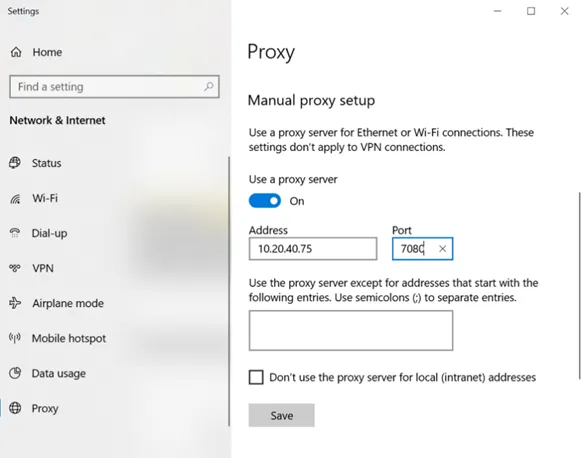
Other Web Browser Settings