Windows Registry Strategy
This section explains how to change the values of subkeys defined in REGEDIT using Application Configuration and Trigger.
WinRM service must be installed on the target server.
While creating an Application Trigger Config using Windows Registry Config, the following values must be written in the Windows Registry Path field with ":\" at the end.
HKEY_CLASSES_ROOT: HKCR:\
HKEY_CURRENT_USER: HKCU:\
HKEY_LOCAL_MACHINE: HKLM:\
HKEY_USERS: HKU:\
HKEY_CURRENT_CONFIG: HKCC:\
For Example: The user wants to change PATH_NAME value with the Vault Account for the
SOFTWARE\DefaultUserEnvironment\SAPMTEST folder, the path information must be like the below:
HKLM:\SOFTWARE\DefaultUserEnvironment\SAPMTEST" -Name "PATH_NAME" -Value "
For this option, an Application Trigger Config definition must be made first.
- Navigate to Secrets > Configurations > Application Configuration.
- Click +Add and enter the parameters.
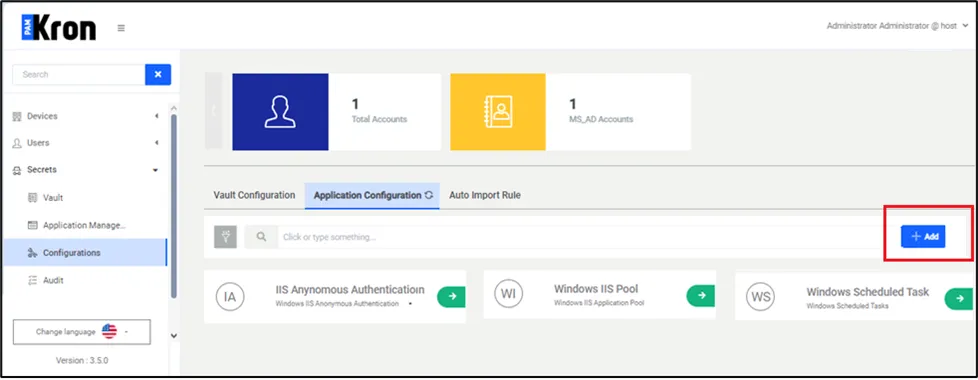
When Windows Registry is selected as the Strategy Type for the WinRM method, the parameters will be displayed on the screen as in Windows IIS App Pools and Scheduled Task configurations. The Windows Registry name, port, and authentication method must be entered in the same way as IIS and Scheduled Task definitions.
- Navigate to the Secrets > Application Management.
- Add a new trigger.
- Click the Add.
- A New Trigger Adding popup will appear.
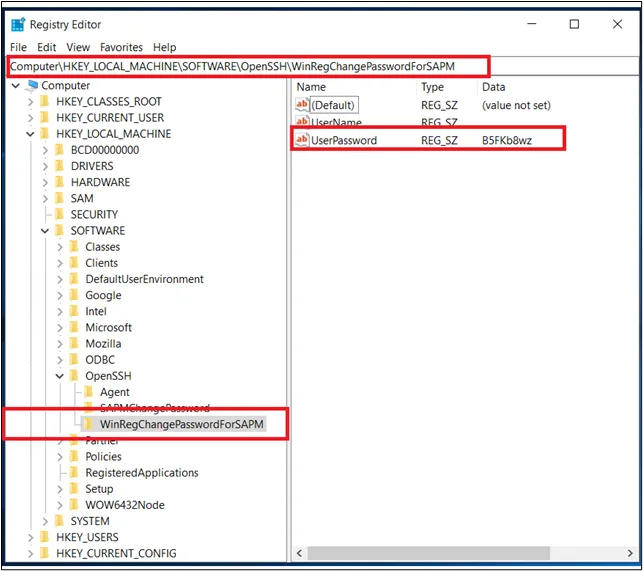
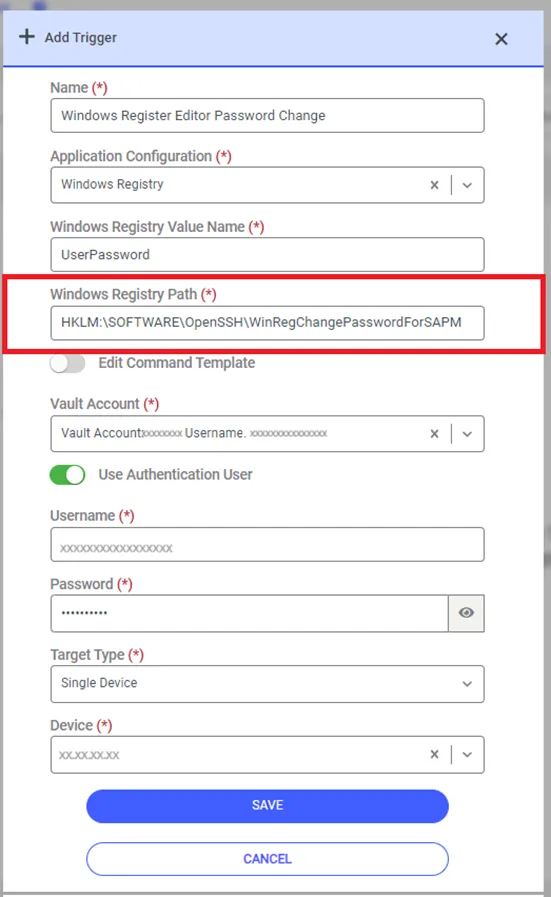
There is a point to be considered when entering Windows Registry Path information.
While creating an Application Trigger using Windows Registry Config, the following values must be written in the Windows Registry Path field with “: \" at the end.
HKEY_CLASSES_ROOT: HKCR:\
HKEY_CURRENT_USER: HKCU:\
HKEY_LOCAL_MACHINE: HKLM:\
HKEY_USERS: HKU:\
HKEY_CURRENT_CONFIG: HKCC:\
- Enter the name of the trigger in the Name field.
- Select the Application Configuration with the defined name above the definition value like Windows Registry.
- In the Windows Registry Value Name field, enter the same name defined in the Windows Registry editor. Otherwise, the password value will not change because Kron PAM cannot find the relevant registry value.
- Select the Vault account whose password needs to be changed.
If the Vault account is authorized to make changes on the Windows Registry, the Use Authentication User switch box can remain inactive. If it is not an authorized user, the Name and Password information of the Administrator user need to be entered in the relevant fields.
- Select the Target Type as Single Device.
- Enter the device information where the Windows Registry is targeted.
- Click Save.

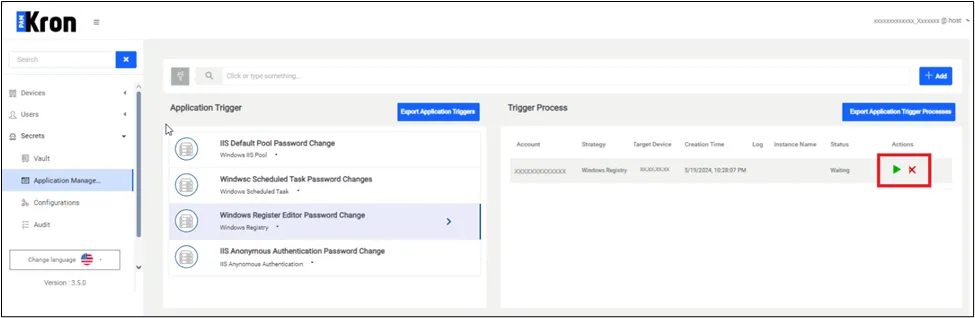
After the definition is completed, open the Vault screen and select the Vault account. Whenever the Vault account is selected and the 'Update' or 'Reset Password' option is clicked, a trigger will be created, and a password change will be performed either automatically at a later time, or manually upon your manual request from the trigger process list shown on the application management page, as pictured below.