Kron PAM-side configuration
As SAML entity ID, please enter the equivalent of the URL below (the exact address depends on customer specifications):
https://adfs.krontech-new.internal/adfs/services/trust
As SAML URL, enter the equivalent of the URL below (the exact address depends on customer specifications):
https://adfs.krontech-new.internal/adfs/ls/idpinitiatedsignon
As SAML Logout URL, enter the equivalent of the URL below (the exact address depends on customer specifications):
https://adfs.krontech-new.internal/adfs/ls/
As SAML Remote URL, enter Kron PAM login page. If something goes wrong during the handshake stage, Kron PAM directs the connection here.
https://{KronPAM.Address}
For SAML X509 Certification Key:
1-Go to the Certificates section on the ADFS management page, right-click on Token-Signing certificate, and click View Certificate.
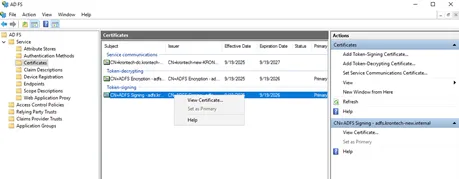
2-Open the Details tab, click the Copy to file button, and click Next.
3-Choose the "Base-64 encoded X.509 (.CER)" option, and click Next. Choose a file name and save the certificate file. Open the saved file on Notepad, and copy its content for pasting to Kron PAM certification section.
Don’t forget to edit the Cors filter as mentioned in the Azure AD ConfigurationEntra ID section to allow ADFS access.