ADFS-side configuration
We assume that ADFS role is already installed on environment.
1-Go to ADFS Management and right click on Relying Party Trust
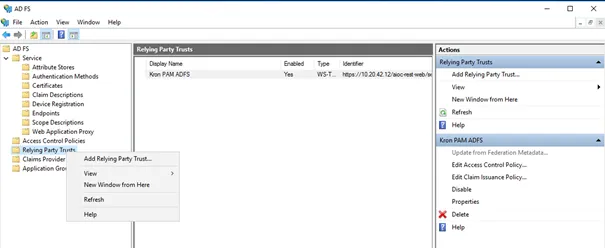
2-Click on Add Relying Party Trust and choose the Claims aware option
3-Choose Enter data about the relaying party manually, and click Next

4-Write A Display name like “Kron PAM ADFS”, click Next, and pass the Configure Certificate screen
5-In the Configure URL section, choose Enable support for the SAML 2.0 WebSSO protocol, and fill the URL with below data then click Next
"kron.pam" stands for the Kron PAM address in the following examples.
https://kron.pam/aioc-rest-web/servlet/saml/samlRecipient

6-In the Configure Identifiers section enter the address below for “Relying Party trust identifier”, click the Add button, and keep clicking Next until the end of the configuration.
https://kron.pam/aioc-rest-web/servlet/saml/samlCheck
7-After completion navigate to the management page and right click on newly created “Relying party Trust”, then click Properties.
8-On Properties, open the “Endpoints” tab and click the Add SAML button. Choose SAML Logout as “Endpoint type” and POST as “Binding” option. And as “Trusted URL” please enter below data then click ok.
https://kron.pam/aioc-rest-web/servlet/saml/samlLogout
9-Then click the Apply button to finish this configuration.
10-Right click “Relying Party Trust” again and choose “Edit Claim Issuance Policy”
11-On the windows that pops up, click “Add rule” and choose “Send LDAP Attribute as Claims” for Claim rule template. Then click Next.
12-On the section below, give a name for the Claim Rule and choose the appropriate option for your actual infrastructure. Claims are sent to Service provider. In the example below, sAMAccountName is taken from Active Directory and being sent as Name ID to Kron PAM. If users are imported from AD to Kron PAM without domain information, the config below should work. Otherwise, LDAPAttribute should be chosen accordingly.