Creating a Masking Method
0 min
A masking method must be defined for the related database types to apply masking policies to databases when using SQL Proxies.
- Navigate to Database Activity Monitoring > Masking Method.
- Click the +Add button.
- Inside the pop-up, enter the Method Name.
- In the Rules, enter Method Pattern, Database Type, and Column Type.
- Click Save.
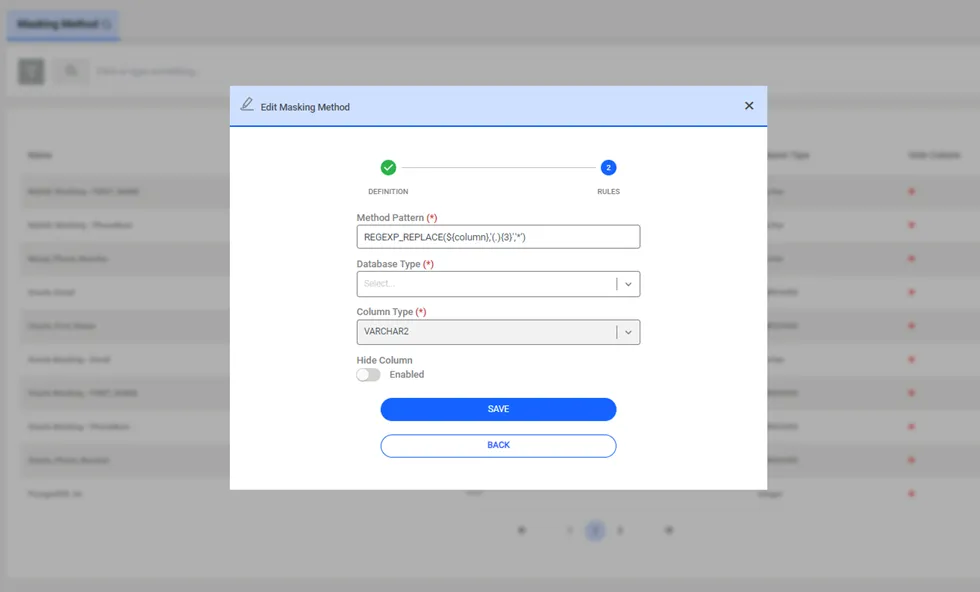
Masking Pattern: Masking functions should be defined in a Java regex pattern. Some patterns are defined by default.
Database Type: Masking functions set in the masking pattern field vary for each database. The correct Database type selection is required to apply masking.
Column Type: The masking policy is applied according to the column type. The correct column type selection is required to apply masking.
Hide Column: The checkbox allows columns to be hidden for any applied method.