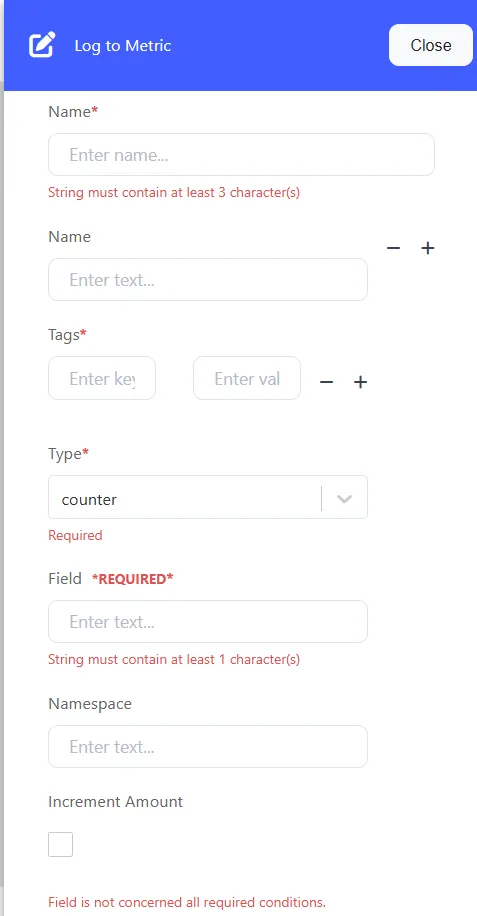
Log to Metric
The process of "log to metric" typically involves transforming log data into a structured metric format and deriving one or more metric events from a log event. This conversion is significant for several reasons:
Standardization: Log data is often unstructured and varies in format. Converting logs to metrics involves standardizing the data into a consistent format, making it easier to process, analyze, and visualize.
Integration with Monitoring Tools: Many monitoring and visualization tools are designed to work seamlessly with metric data. Converting logs to metrics enables better integration with these tools, enhancing the overall monitoring and management of systems.
How it works
Multiple Metrics
For clarification, when you convert a single log event into multiple metric events, the metric events are not emitted as a single array. They are emitted individually, and the downstream components treat them as individual events. Downstream components are not aware they were derived from a single log event.
Reducing
It’s important to understand that this transform does not reduce multiple logs to a single metric. Instead, this transform converts logs into granular individual metrics that can then be reduced at the edge. Where the reduction happens depends on your metrics storage. For example, the prometheus_exporter_sink will reduce logs in the sink itself for the next scrape, while other metrics sinks will proceed to forward the individual metrics for reduction in the metrics storage itself.
State
This component is stateless, meaning its behavior is consistent across each input.
Metrics
Required: A list of metrics to generate.
Description: Defines the metrics that should be generated from the log data. This list includes various configurations related to the metric's field, type, and tags.
Field
Required: Specifies the field in the event to generate the metric.
Description: This field is the source for the metric value in the event. Supports dynamic values using Vector's template syntax.
Example: metrics.field: "duration"
metrics.increment_by_value
Optional: Determines if the counter is incremented by the field value instead of just 1.
Description: When set to true, the counter will be incremented by the value in the specified field.
Example: metrics.increment_by_value: true
metrics.kind
Optional: Defines the type of metric (absolute or incremental).
Description:
Absolute: Represents the latest value.
Incremental: Adds or subtracts values.
Enum options: absolute, incremental (default: incremental)
Example: metrics.kind: "incremental"
metrics.name
Optional: Overrides the name of the generated metric.
Description: If not specified, the field name will be used as the metric name. Supports dynamic values via template syntax.
Example: metrics.name: "custom_counter"
metrics.namespace
Optional: Sets the namespace for the metric.
Description: Defines the namespace for the metric, which can also be dynamic via template syntax.
Example: metrics.namespace: "app_metrics"
metrics.tags
Optional: Defines tags to apply to the metric.
Description: Tags are used to attach metadata to the metric, and both keys and values can be templated. This allows dynamic tagging.
metrics.type
Required: Specifies the metric type to generate.
Description: Defines what kind of metric is created (e.g., counter, gauge, histogram, set, or summary).
Enum options: counter, gauge, histogram, set, summary
Example: metrics.type: "counter"