HTTP Proxy SSL/TLS Mode
Secure HTTP (HTTPS) is already supported in Single Connect. Configurations are the same for both HTTP and HTTPS. All HTTP requests, responses, headers, and contents sent and received during the session are logged indisputably.
Although Single Connect secures all communication after authentication through HTTPS protocol, authentication is performed through the HTTP protocol by default on the web browser; this information can be obtained if the network is captured. To eliminate this risk, the HTTP Proxy can be configured to use the HTTPS protocol, even for proxy authentication.
To enable SSL on the HTTP Proxy, the http.proxy.ssl.enabled parameter should be set as true and the http.proxy.protocol parameter should be changed from HTTP to HTTPS. These parameters are located under /u01/http proxy/conf/http_proxy.properties. This property is used together with the http.proxy.host parameter - meaning that if the http.proxy.ssl.enabled parameter is set to true, the HTTP Proxy generates a certificate at runtime containing the given host as the Subject Alternative Name to ensure it is trusted by the browser. Otherwise, the browser will reject requests. Therefore, to configure HTTP Proxy settings on the browser or OS, the http.proxy.host parameter must be the same as the given host/IP.
To use this feature, the web browser must be started with the HTTPS protocol for authentication. For the Chrome instance, it must be started as follows in the end-user browser to start the session with SSL:
chrome --proxy-server=https://HTTP_PROXY_HOST:7080
As shown in the Chrome browser example, end-users must open other browsers differently. Since this feature affects the end-user experience, it must be configured carefully.
HTTP Proxy in SSL/TLS Mode Usage with Single Connect Desktop Client
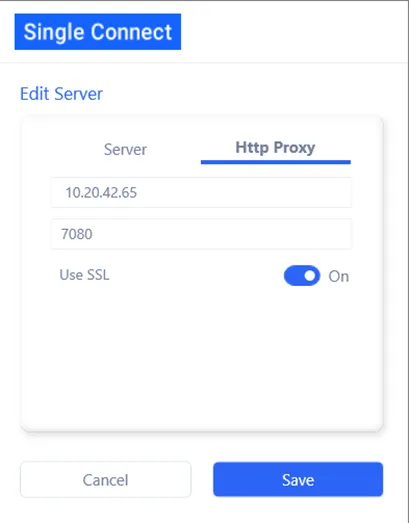
When reaching HTTP Proxy which operates at SSL/TLS mode from the Desktop Client, the Use SSL must be checked under the HTTP Proxy tab in the Single Connect Desktop Client.