Backup Manager
Single Connect has a backup system which makes it reliable in case of emergencies by creating a backup of the database. The backup file can easily be stored in any SFTP server using the Single Connect GUI.
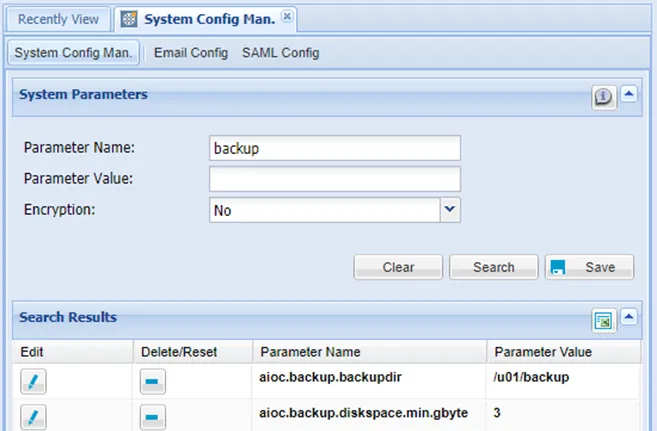
The required parameters need to be set in the System Config database before a database backup can be created using the Single Connect GUI.
To set the parameters:
- Navigate to Administration > System Config Man.
- Add the parameters below.
Parameter Name | Parameter Value | Example Values |
|---|---|---|
aioc.backup.diskspace.min.gybte | Required disk space for the SFTP server to transfer the backup file. The value should be set according to the size of the database to be backed up. | 3 |
aioc.backup.backupdir | Backup directory path in Single Connect. The file path /u01/backup must be manually created in Single Connect before starting a backup. The backup file is initially created in this path, and is then transferred to the path defined in the parameter aioc.backup.sftp.dirname. | /u01/backup |
aioc.backup.sftp.server.ip | Server IP the backup file will be transferred to. | 10.20.30.40 |
aioc.backup.sftp.dirname | Directory path where the backup file will be sent to in the target SFTP server defined in the aioc.backup.sftp.server.ip parameter. | /root/backupfiles |
aioc.backup.sftp.username | Username with which to connect to the SFTP server defined in the aioc.backup.sftp.server.ip parameter. | root |
aioc.backup.sftp.password | Password of the user defined in the aioc.backup.sftp.username parameter. The parameter must be defined with the encryption option yes. | |
To create the backup:
- Navigate to Administration > Backup Management.
- Click the Backup button.
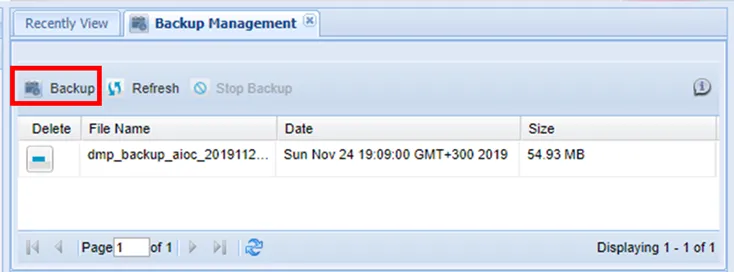
If needed, after it starts, the backup process can be stopped by clicking the Stop Backup button.
The backup files can be viewed on the Backup Management page. All backup files in the backup directory are listed when opening the page. The Refresh button will update the list of backup files.