Adding AWS Devices to specific Device Groups
1 min
Single Connect imports AWS instances based on their tags. If an AWS instance is to be imported into Single Connect, that instance must have all the tags specified in at least one device group.
To create a group with AWS tags:
- Navigate to Device Management > Device Groups.
- Create a new Device Group, or use an existing Device Group.
- Right-click the desired Device Group, and select Show Properties.
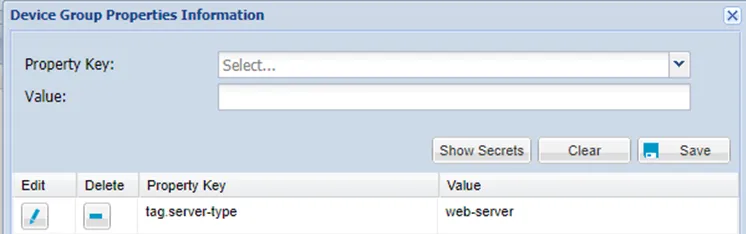
AWS Device Group Tags
- Tag values can be written in regex format.
When importing devices from cloud platforms, the Management IP is set according to the values of the tag.DiscoverInterfaceType property defined on the device group. The property can be set as public or private. The default value is private.