Log in to Remote Application with an SAPM User
As with the Secret Data Vault scenario, a user account can also be kept in the SAPM, as illustrated in the figure below. When configuring the log in to a remote application with a SAPM user, the definition of an IP address is mandatory, and can be selected from a combo box, meaning it has to be selected from among the devices already added to Single Connect. The IP address is the target device’s IP address, and should match the “Device IP” configured in the Auto login screen in order for the SAPM account to be seen on the auto login screen to the target application. To use this account for remote app auto login, assign this credential to the session account. For more information, see Assigned Credentials.
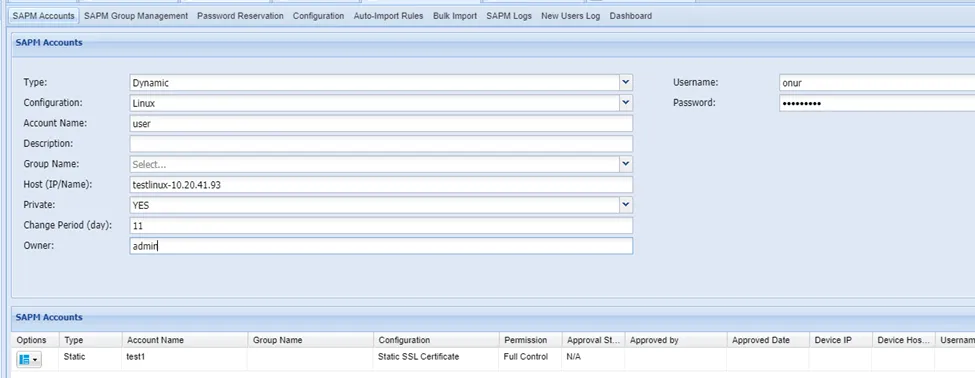
Sometimes more than one device per user are kept in SAPM. In such cases, the user to be used while logging in to the remote application should be identified. The following figure shows the SAPM account configuration for remote application login.
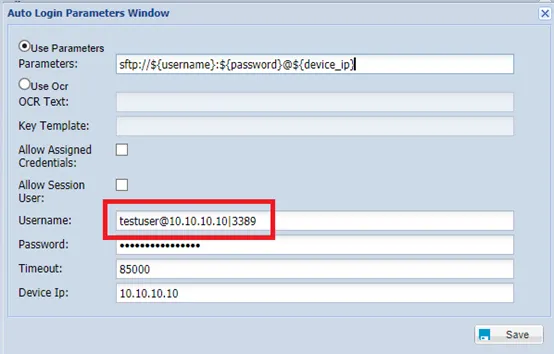
AS we mentioned SAPM accounts also can be assigned to session user to us those accounts for remote app Auto Login.