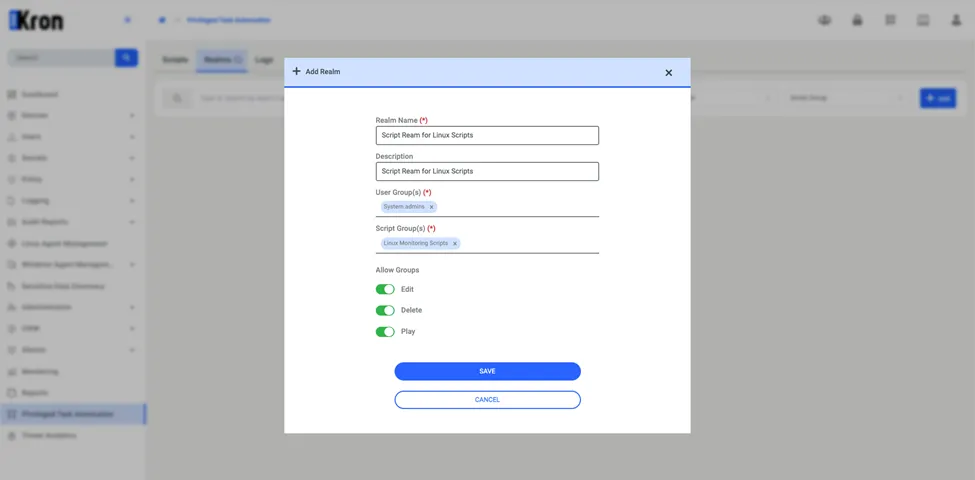
Adding Script Realm
Script realms in Privileged Task Automation manage script execution permissions by associating user groups with script groups. Administrators use script realms to define which user groups can run, edit, or delete scripts within specified script groups.
You must hold the kronpam.pta.realms.manage portal function to add, edit, or delete a script realm. Users who hold only kronpam.pta.realms.moduleVisibility can only view the script realms that include their own user groups in read-only mode. At least one user group and one script group must exist.
To add a script realm:
1. Navigate to Privileged Task Automation > Realms.
2. Click Add in the upper-right corner of the Realms tab.
3. In the Add Realm window, provide the following details:
Realm Name: Enter a descriptive name for the script realm.
Description: Enter a brief description that explains the purpose of the realm.
User Group(s): Select the user groups that can access the scripts in this realm.
Script Group(s): Select the script groups that the realm includes.
4. Under Allow Groups, configure the permissions for user groups:
Edit: Turn on this option to allow users to edit scripts.
Delete: Turn on this option to allow users to delete scripts.
Play: Turn on this option to allow users to run scripts.
5. Click Save.