User Token Management
Administrators have full privileges on the system and can view token information for all users. However, in certain cases, it may be required that the admin does not have access to users' token information.
To enable this feature in the system, follow these steps:
- Navigate to the System Configuration Management screen.
- Add New System Parameter.
- Add the following system parameter:
- Parameter Name: mfa.token.visibility.by.admin.for.all.user
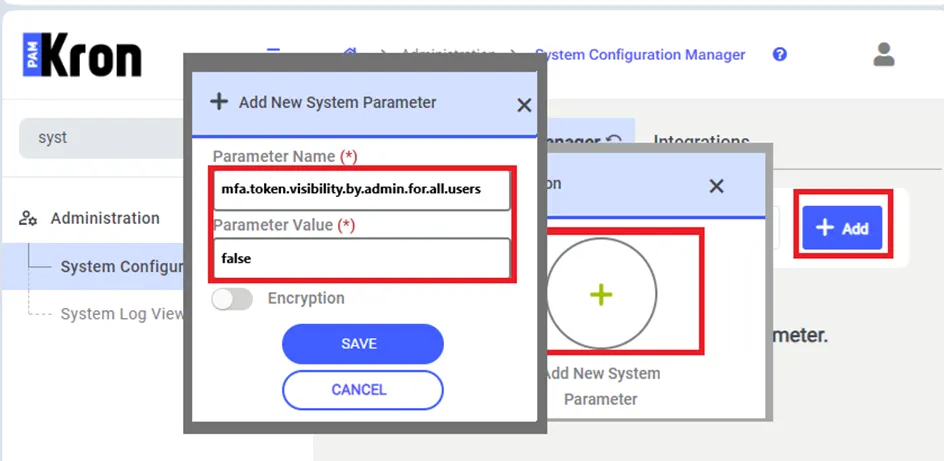
If the Parameter Value of mfa.token.visibility.by.admin.for.all.users defined as False then the system will not show any user's token information to the Admin user.
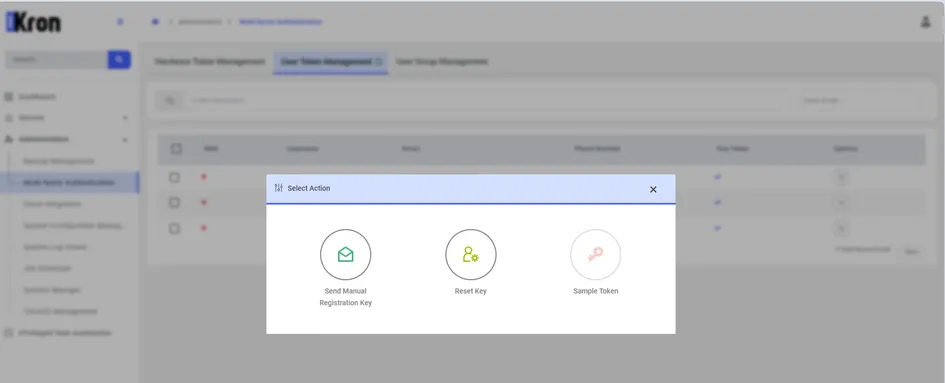
If the parameter is set to either False or True and the user entering the system is not an Admin user, everyone's Sample Token button except the user's own will be disabled, even if this screen is reachable. If the parameter value of mfa.token.visibility.by.admin.for.all.users is defined as False, Admin users will not be able to click the Sample Token button for any user except themselves.