Session Log Control in SSH Proxy
Kron PAM allows for privileged users’ sessions to be logged. There is detailed information related to the session logs in the Kron PAM LogsKron PAM Logs chapter of this document. If a user is authorized to view session logs, they can access both SSH session video records and command logs. Properties can be defined in the User Groups (refer to User Group Properties) to control which users are enabled access to session video records and command logs. To configure these settings:
- Log in to the Kron PAM Web GUI.
- Navigate to Users> Users
- Click the desired User Group, and select its properties.
- Click the Add New Property.
- Add the below parameters:
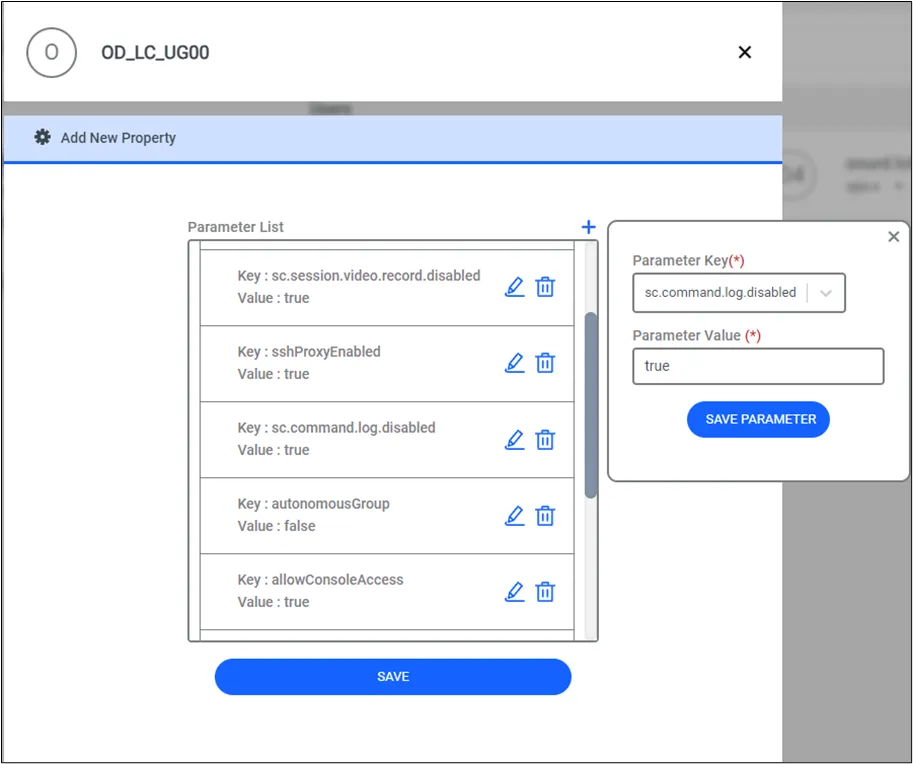
Parameter | Definition |
|---|---|
sc.command.log.disabled | Controls enable command log viewing for users able to see session logs. The default value is false. If the parameter is true, the users in the related user group will be blocked from viewing command logs. |
sc.session.video.record.disabled | Prevents session video recording. Default value is false. When set to true, session videos will not be recorded. This parameter controls recording itself, not viewing permissions. |
To enable encryption for video recordings, the parameter session.record.encryption.enabled should be set to true in the system configuration manager. Default value is false. Setting this parameter to true will ensure that all session recordings are encrypted during storage. This parameter applies only to RDP and SSH proxy logs (HTTP proxy container-based session recording uses the infrastructure of RDP proxy).