MFA Configurations for VPN Services
Kron PAM MFA can be used as a 3rd party MFA server for all applications, devices, VPNs, etc. that support RADIUS authentication. Two options are available for MFA server support:
- Both the first authentication (with username and password) and the secondary authentication (with OTP) are provided via Kron PAM. To activate this feature:
- Define the VPN device according to the TACACS Access Manager configuration.
- Enable MFA on the User Group (Navigate to Administration > MFA > User Group Management)
- Only a secondary authentication with OTP can also be provided via Kron PAM. To activate this feature:
- Define the VPN device and the Device Group Realm with the related users in Kron PAM (See User Group Creation and Device Management sections.)
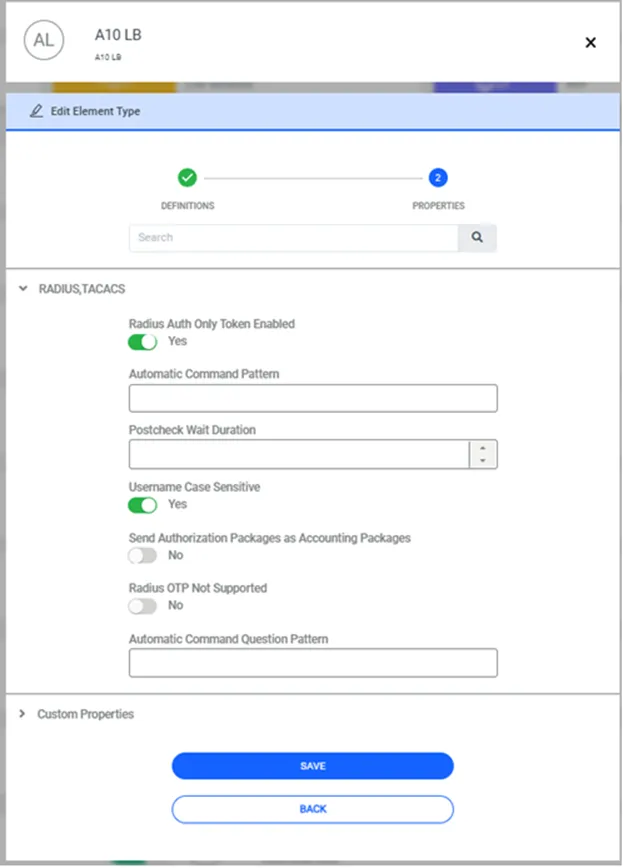
- Enter the element type property in the VPN Device element type section:
- Navigate to Device > Element Type.
- Select the Element Type, then proceed by clicking the Actions button (green arrow)
- Click Edit Element Type.
- Select Authentication Device as an Association Tag and proceed with the Next button.
- Expand the RADIUS – TACACS menu on screen.
- Switch the Radius Auth Only Token Enabled parameter to ON