Huawei eSight
After modifying device passwords via the command line (CLI) using the IPMI Vault Configuration, it is a critical step to update the new credentials within the Huawei eSight application to ensure uninterrupted communication with the managed hardware. This synchronization process enables eSight to maintain its monitoring, management, and alarm collection capabilities over the target equipment; otherwise, eSight will continuously attempt to access the device using the outdated password, resulting in authentication failures and a complete loss of management connectivity.
1. Navigate to Secrets > Configurations > Application Configuration screen.
2. Select Strategy as Huawei eSight
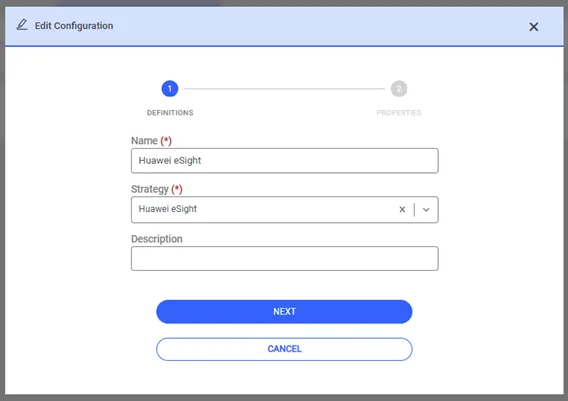
3. Enter the admin username (Service Username) and password (Service Password) information for connection to Huawei eSight server.
4. Enter the Huawei eSight Server IP and port information for the HTTP connection to Huawei eSight.
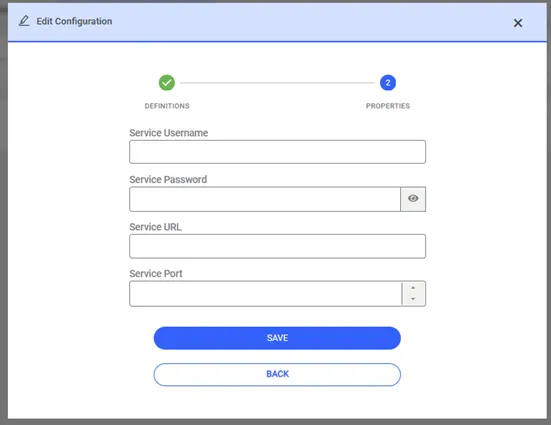
5. Click the Save button.
6. Navigate to Secrets > Application Management screen
7. Add a new trigger.
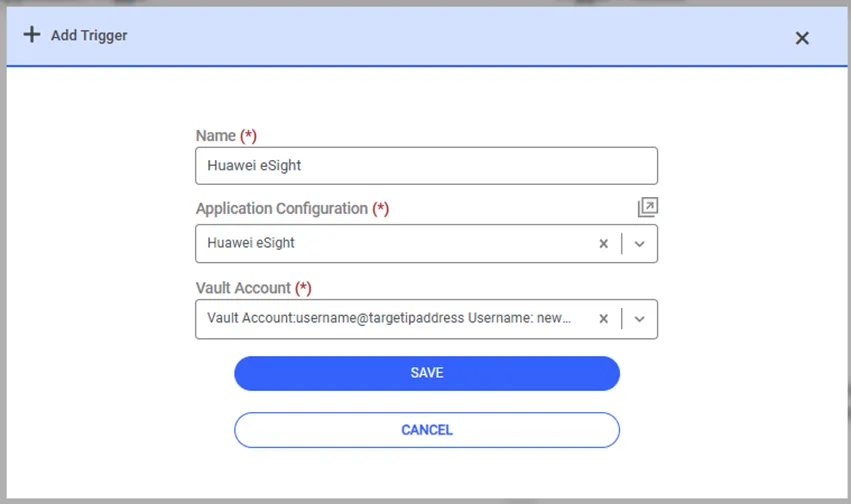
After the definition is completed, open the Vault screen and select the Vault account. Whenever the Vault account is selected and the Update or Reset Password option is clicked, a trigger will be created as explained in the previous sections, and a password change will be performed.