Vault Secondary Password Definition (Dual Lock)
Dual Lock function is a feature that provides extra security used to see the password by performing an OTP check when a user other than the owner of a defined vault wants to access the password or take other actions. You will find information about how this feature is defined and how it is used below
- A switch box called Enable Dual Lock will be added to the Add Account panel of the Secret > Add Vault Account screen. The default value will be OFF.
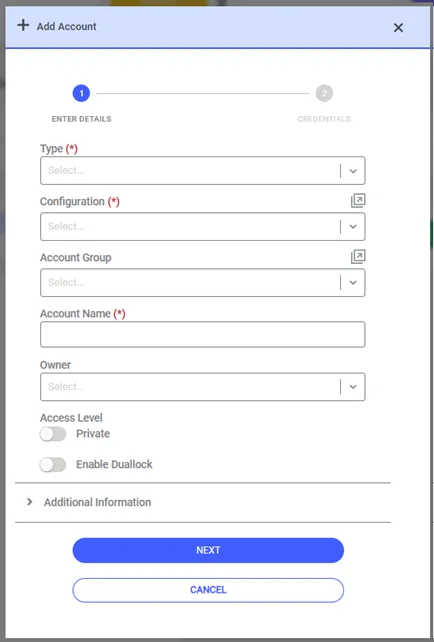
- If the user fills in the relevant fields and turns the Enable Dual Lock switch box ON, the feature will activate. When a user other than the owner of the vault, who has been given permission, wants to make transactions with the vault, a pop-up will appear on the screen where the OTP value will be asked.
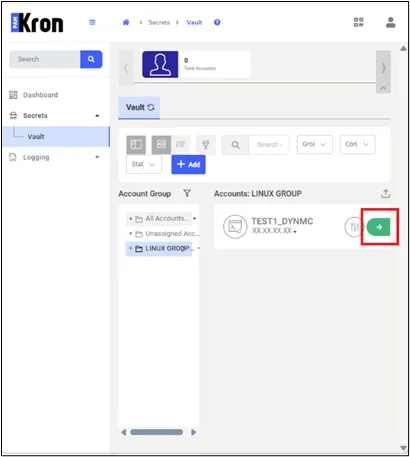
CheckOut Password for Duallock Parameter Defined ON
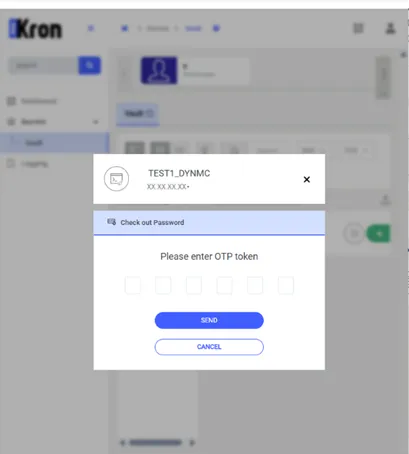
- If the One Time Password value is incorrect or expired, the user will be informed that the OTP value is incorrect.
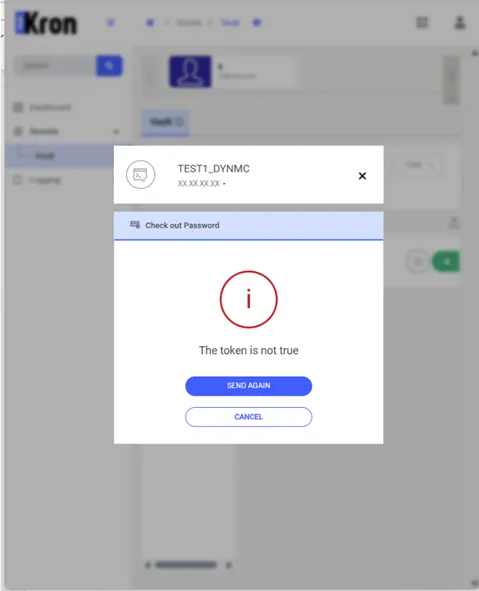
- Every time the user wants to operate with the Checkout Password or Actions button for a Vault account whose Dual Lock parameter is defined as On, OTP will be necessary. These transactions will also be saved in the Vault logs.
- If you do not want to see the Enable Dual Lock switch for any account for any reason, the sapm.duallock.option.hide parameter can be set to true on System Config. Manager, and the relevant parameter will no longer be displayed on the Vault account creation screen.