Session User (LDAP/AD User) Connection
If both the target systems and Kron PAM are integrated with LDAP/AD, users can log in to target systems with their LDAP/AD credentials. This feature can also be used when the username and password of a Kron PAM user is configured as an account with the same username and password in the target system. This user is referred to as the Session User.
If there are no credentials configured for the device group (such as Manual Login, Direct Credential Username/Password a.k.a. Global Username, Vault, or Assigned Credentials), Kron PAM logs into the target device as an LDAP user. If any of the credential methods mentioned above are configured, Kron PAM will establish the connection with the configured method.
Kron PAM allows the selection of the authenticated user that will be able to connect to the target devices (Multiple User Selection in SSH Proxy). Even if any of the methods mentioned above is configured for the connection, a Session User can be added as a choice.
If the target device requires FQDN addresses, the following configuration is required in addition to the session user login being enabled under Additional Credentials:
- Navigate to Devices > Device Groups.
- Click the device group and select the Properties option.
- Click the Edit and Next buttons.
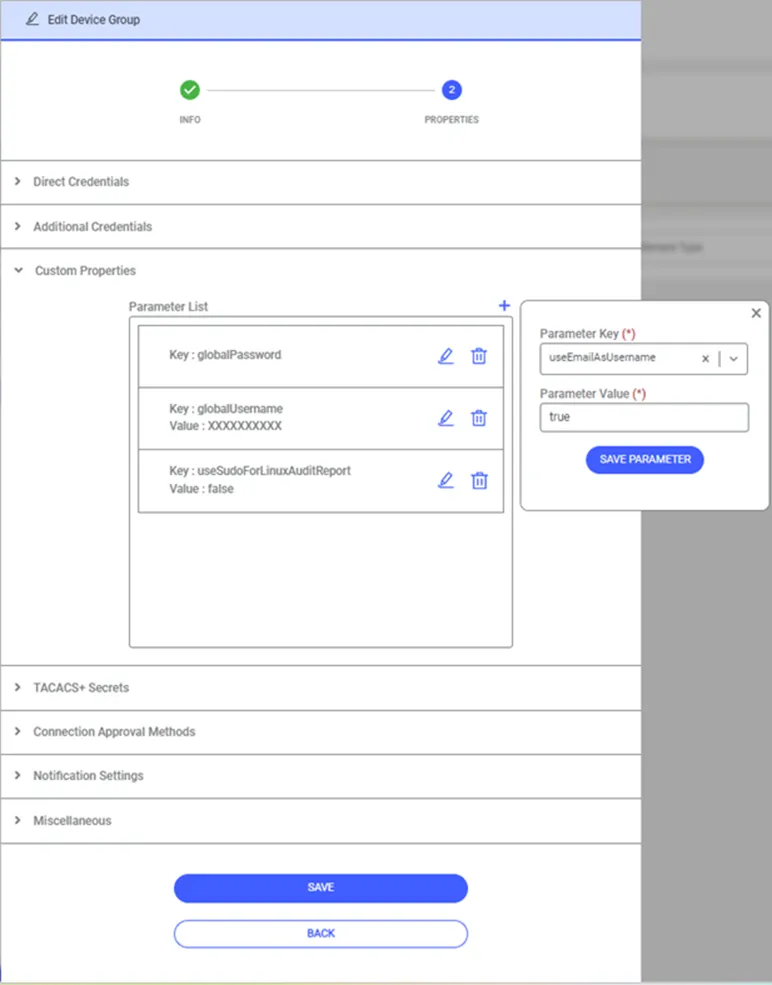
- Select the Custom Properties.
- Create the useEmailAsUsername property with its value set as true.
- Save.