Global Username/Password Connection
Predefined users in the target device group are called Global Users. To establish an SSH connection using such an account, and to make the global user password invisible to local users, the configuration outlined below must be in place, allowing Kron PAM to store the global user credentials to be used for the connection in its database.
- Navigate to Devices > Inventory.
- Click the device group and select the Show Properties option.
- Click the Edit button.
- Under Direct Credential set the username.
- Set the password.
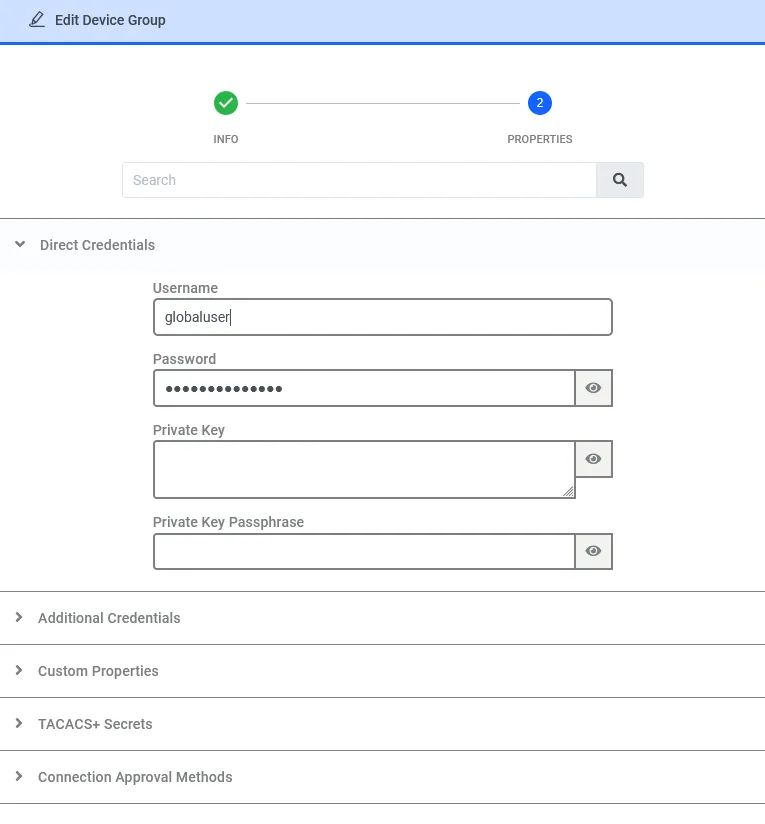
When connecting to a device with a Direct Credentials, priority rules are applied:
- First Priority: If a Vault account with the same username as the global username exists, the Vault password or the rotated SSH key will be used for global user authentication.
- Second Priority: If a Vault account is not defined, the global SSH key will be used to connect to the device.
- If these two options are not present in the device properties, the Direct Credential Password will be used to connect to the device. The Direct Credential Password has the lowest priority.
- If the device requests both the SSH key and password for authentication, the Vault account password will be used with the highest priority, and the Direct Credential Password will be used as the second priority.