Password Vault
The Password Vault feature is used to store shared privileged accounts’ passwords that may be used by more than one person. Password Vault stores 2 types of accounts: Dynamic and Static.
In dynamic accounts, once an account is configured in the Password Vault, the Vault connects to the system on which the account exists. It then changes and stores the password after encrypting it. During the password lifecycle, the Password Vault changes the password periodically, and after each checkout. It logs checkout details like the user, date, time, and reason, and provides accountability for password checkout events.
Static accounts are accounts whose passwords are statically stored on the Password Vault. Before adding a device’s local accounts to Password Vault, the account passwords are checked and stored. These static accounts that are saved after being checked are called dynamic configured static accounts. When static accounts are stored without any device connection, they are called static configured static accounts.
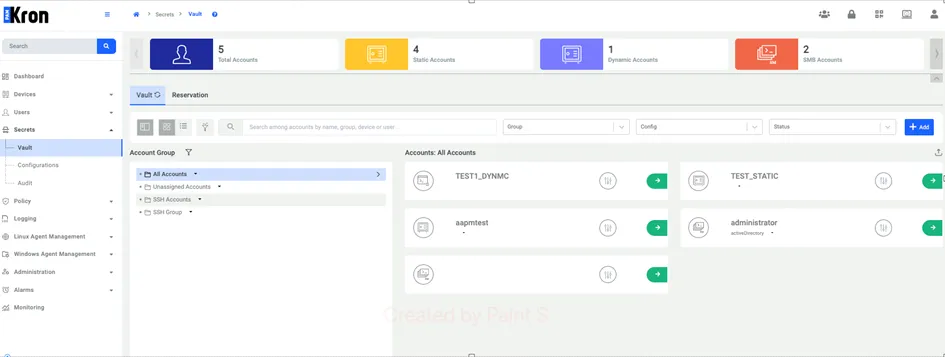
To view the Vault Accounts, navigate to the Vault section under Secrets in the left-hand pane. There are two available display styles: card view (default) and list view. By default, Vault Accounts are shown in card view. To switch to list view, click the list view icon located next to the filter icon. This will display the users in a tabular format.
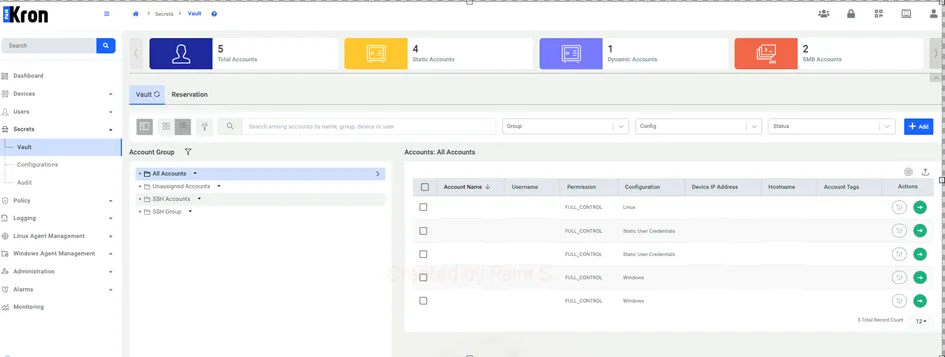
In the list view, you can customize the visible columns using the gear icon. When you click the gear icon, a configuration panel appears as shown below. From there, you can select or deselect the Vault Account properties you want to display. You can choose up to eight properties at a time; selecting more is not allowed. Default configs can be applied if “Restore default” option is chosen.
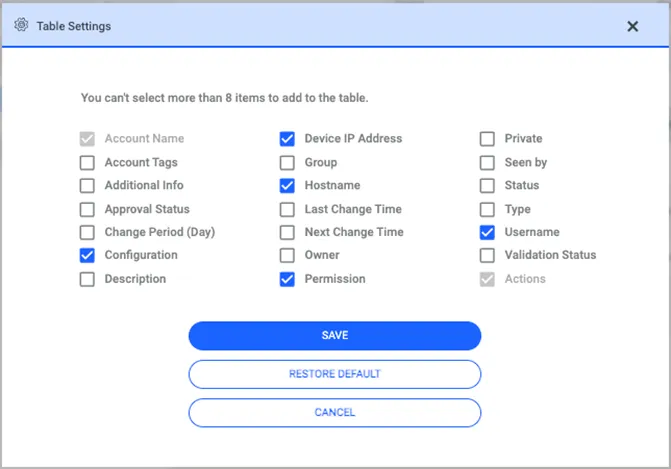
If you customize the column settings in the Vault Account list view during an active session, your preferences will be remembered. When you navigate away from the page and return later within the same session, the list view will reflect your previously selected configuration.