Password Generator
With this functionality, users have a password suggestion system on the screen when adding a new static Vault account or setting a new password to an existing Vault account.
Users are able to define the password parameters should include or exclude the following values:
- Number s,
- Lowercase letter s,
- Uppercase letters,
- Special characters,
- Exclude list.
The user enters the Vault Definition screen and clicks the Add Account button. On the opened screen, they entered the mandatory fields such as Account Name, Type, and Configuration.
When the Type value is set to Static and the user clicks the Next button, the second page will open and the Password Generation button, next to the Password field, will be enabled.
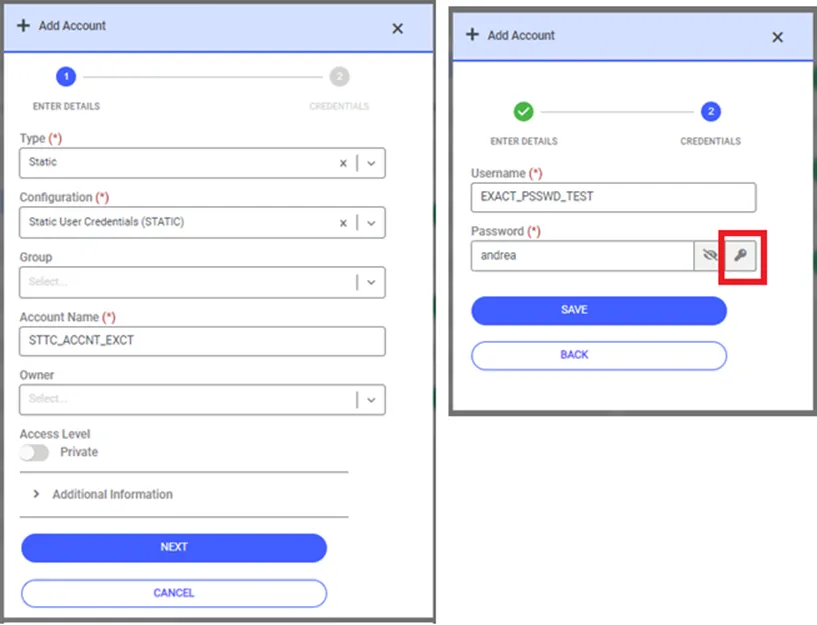
When the user clicks the Password Generation button, a screen will open where the parameters for generating the password can be selected.
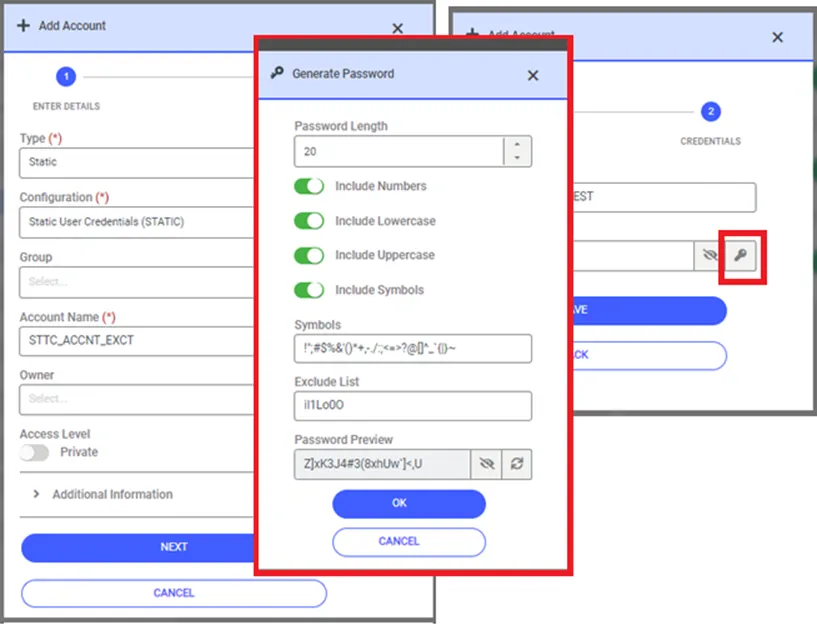
- The length of the password and the parameters defining which characters the password will include (Number, Lowercase, Uppercase, Symbols) and which characters it will exclude (Exclude List) can be selected using the relevant buttons on the screen.
- After selecting the parameters, the password will be generated by clicking the Generate Password button on the screen. Clicking the same button again will generate a new password.
- By entering the characters that should be excluded in the Exclude List field, users can remove those characters from the password generation process.
- Upon clicking OK the screen will close, and the generated password will be automatically filled in the Password field on the previous page.