Adding Permissions to Password Vault Groups
Permissions for Password Vault accounts can be assigned to user groups or users as well.
After each permission is assigned at a group level, you will be asked if you would like the permissions to also be valid for sub-groups. You can select Yes or No to apply the rights to sub-groups or not, respectively. Permission can be given to the Group, the Group and the accounts under it, or the Group Full Tree on the Password Vault Group Tree.
To assign Permissions to Password Vault Groups:
- Navigate to Secrets > Vault.
- Open the Vault tab.
- Find the desired group in the group tree, and click the the Options button that appears when you hover the mouse cursor over the name of the group.
- Select the Permissions option from the menu.
- Assign the permissions to the groups, just like for individual accounts.
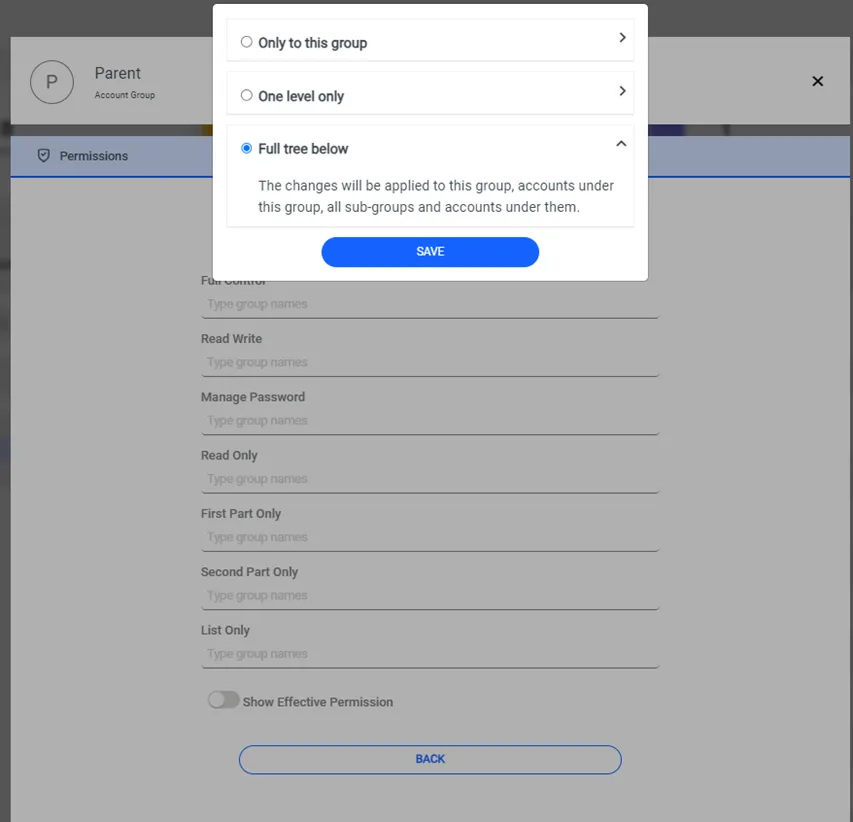
Adding Permissions to Password Vault Group
THIS ONLY: Apply Permission to this group only.
ONE LEVEL: Apply Permission to this group and accounts inside this group.
FULL TREE: Apply Permission to this group and all inherited subgroups and accounts under them.