Notifications over SAPM Account
Notifications can be set for Dynamic accounts and Dynamic Configured Static Accounts, using the SAPM Account screen. If this option is set, notifications regarding the account are sent to the selected User Groups.
- A user retrieves a password for an SAPM account.
- A Password Reset Failed error occurs during the SAPM account password reset.
- The password cannot be verified during the periodic check of the SAPM account password due to a Password Check Problem error.
- A new user is detected on a device with a SAPM account (The new user detection feature depends on the configuration, and can be disabled for specific accounts).
To activate the notifications on SAPM Accounts:
- Navigate to SAPM Management > SAPM Management.
- Open the SAPM Accounts tab.
- Select the account, click the Options button, and select Configure Notifications.
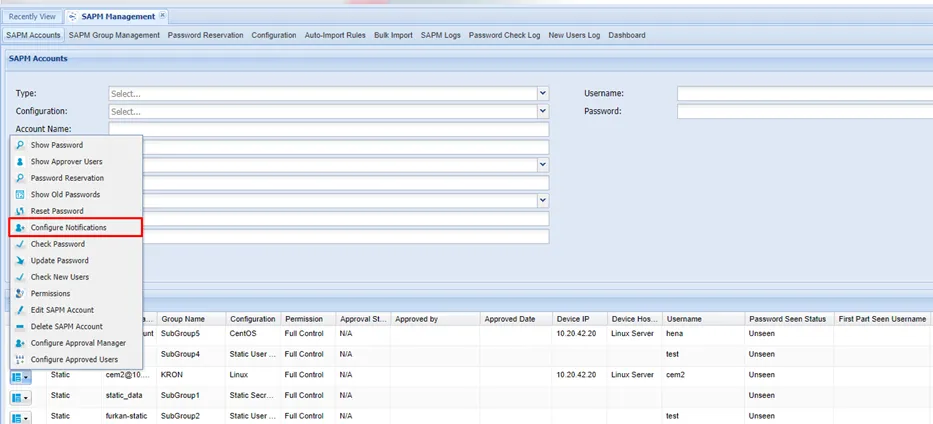
Configure Notifications for SAPM Accounts
- Select the User Group.
- Click Save.
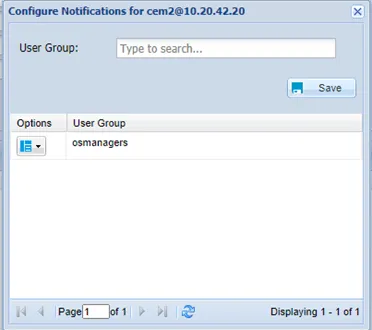
Configure Notifications for Account