Group Manager Authorization via Email
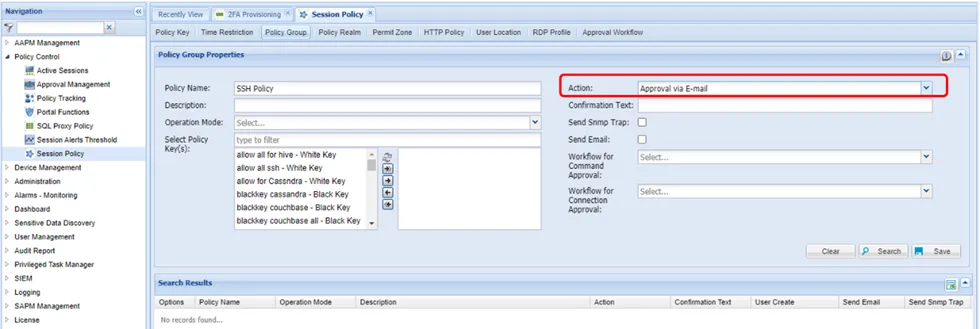
The Group Manager Authorization via Email feature can be configured for Kron PAM proxies and helps to manage authorizations during sessions. To enable managerial approval for commands as an authorization policy, the desired policy group needs to have the Approval via Email action enabled.
To configure this feature:
- Navigate to Policy Control > Session Policy.
- Open the Policy Group tab.
- Select the policies, choose Approval via email from the Action Menu, and click Save.
- Configure the Policy Realm for the defined policy group as well.
This policy is used to get authorization from the group manager whenever a user runs a command configured with the Group Manager Authorization via Email feature. The group manager approves the request by clicking the link included in the email.
The http.proxy.approval.email.timeout parameter has been added under /u01/http-proxy/conf/http_proxy.properties. This property represents the approval request selection timeout, in seconds, from the moment the approval request is produced. Approval requests are selected either if the current time is between the request start time and end time, or if the timeout does not expire.
Applicable for sc_policy_connection_approval records in 'WAITING' or 'FIRST_LEVEL_APPROVED' status. Any value <= 0 means no timeout. The default is 0. Example: http.proxy.approval.email.timeout=0