What to check if the Tenant Connector is not working (Troubleshooting)
1-Check that the secure boot is disabled on both the Kron PAM server and the tenant connector; if it is enabled, WireGuard might not work:
Linux CLI: [root@connector~]# mokutil --sb-state
2-Check the WireGuard configuration file on the Kron PAM server and the tenant connector:
*Read the Wireguard Config File Command:
Linux CLI | [root@pam~]# cat /etc/wireguard/wg-vpn-{port-number}.conf |
|---|---|
Example | [root@pam~]# cat /etc/wireguard/wg-vpn-10001.conf [Interface] PrivateKey = AAA231425CfCy55zsfG/37XkIZmngeV8az+XXXXXX= Address = 192.168.0.2/32 Endpoint = ${VPN_NODE_IP}:${TUNNEL_PORT} ListenPort = 10001 [Peer] PublicKey = AAAyno14GRH7aadq6cBzATMg8bVB3Ac5Ry3KuXXXXXX= AllowedIPs = 192.168.0.1/32 PersistentKeepalive = 25 |
Linux CLI | [root@connector~]# cat /etc/wireguard/wg-vpn-{port-number}.conf |
|---|---|
Example | [root@connector~]# cat /etc/wireguard/wg-vpn-10001.conf [Interface] PrivateKey = BBBlD/N5r2ff1pfIxu2d5aYk3cppDeDiXZjtBYYYYYY= Address = 192.168.0.1/32 ListenPort = 10001 [Peer] PublicKey = BBByno14GRH7aadq6cBzATMg8bVB3Ac5Ry3KuYYYYYY= AllowedIPs = 192.168.0.2/32 Endpoint = 10.10.10.10:10001 PersistentKeepalive = 25 |
*Ping the Kron PAM server’s WireGuard IP address and the tenant connector’s WireGuard IP address on both environments (you should see that messages are received/sent).
Linux CLI | [root@pam~]# ping {connector’s wireguard public IP} |
|---|---|
Example | [root@pam~]# ping 192.168.0.1 |
Linux CLI | [root@connector~]# ping {pam’s wireguard public IP} |
|---|---|
Example | [root@connector~]# ping 192.168.0.2 |
3-Check the iptables rules on the tenant connector machine:
4-Check the status of the pam-connector.service on the tenant connector machine:
5-Check the port allowance at the server level that is defined in the firewall service:
Stop the firewall service if it is not needed
6-Check the heartbeat messages on the Tenant Connector page of Kron PAM Web GUI: (you should see that the heartbeat is received by the Kron PAM server with a red line at the 4)
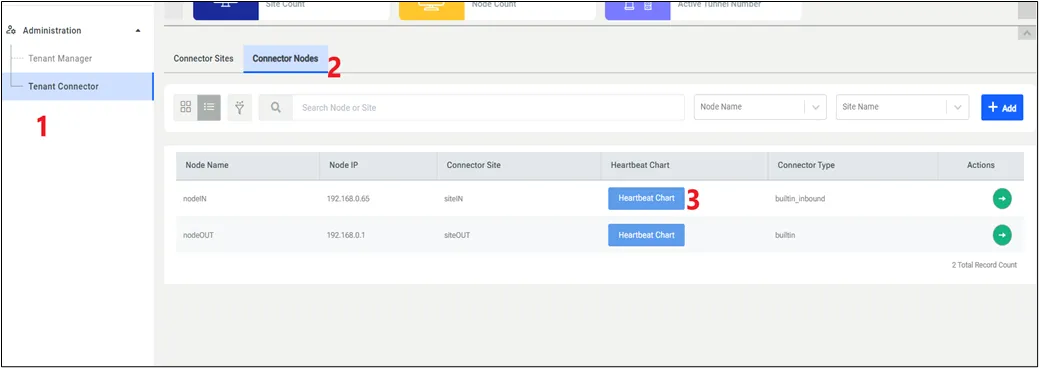
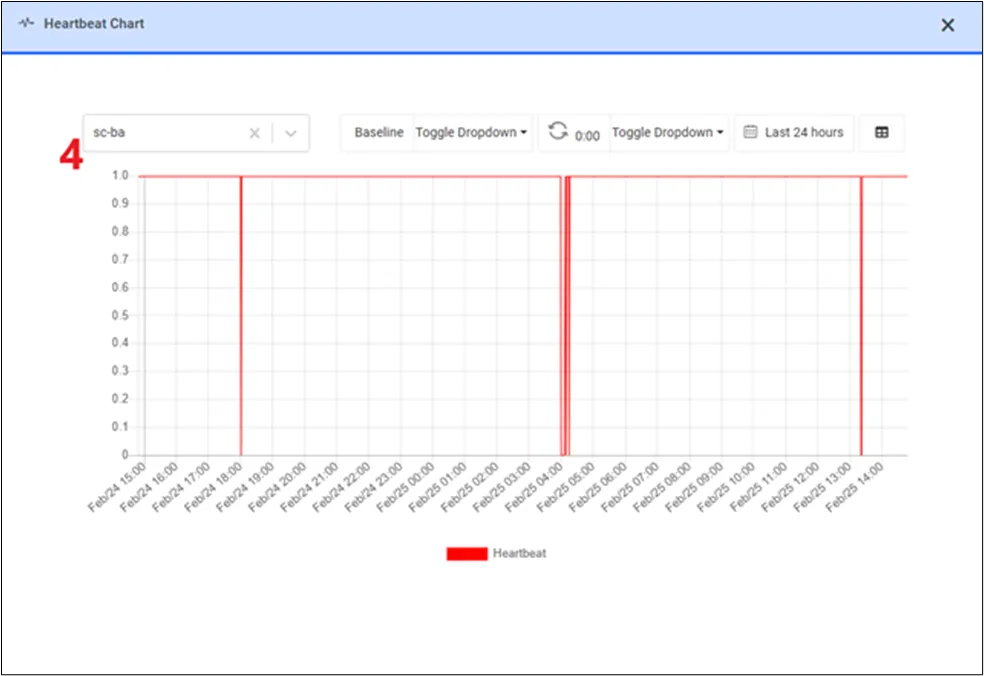
7-Check the IP routing configuration on the tenant connector:
The result should be 1, if it is 0, please enable IP routing by setting it to 1:
8-Check the SELinux security mode on the tenant connector:
The result should be permissive; if it is enforcing, please select permissive security mode with this command:
9-Check the connector.log under /pam/gui/logs on the Kron PAM server during the tenant installation after pressing the SAVE button on the GUI:
10-Check the catalina.out and localhost_access_log.2025-XX-YY.txt under /pam/gui/logs on the Kron PAM server during the session opened on the device assigned to the tenant connector:
Linux CLI | [root@pam~]# tail -1000f /pam/gui/logs/localhost_access_log.2025-{XX-YY}.txt |
|---|---|
Example | root@pam~]# tail -1000f /pam/gui/logs/localhost_access_log.2025-02-25.txt |
11-If you have seen this problem during the MTC installation:
Linux CLI | [root@connector~]# sh configure.sh … Errors during downloading metadata for repository 'appstream': - Curl error (60): Peer certificate cannot be authenticated with given CA certificates for https://mirrors.rockylinux.org/mirrorlist?arch=x86_64&repo=AppStream-8 [SSL certificate problem: certificate is not yet valid] … |
|---|
Please check the system clock and sync the clock time:
systemctl enable chronyd --now
chronyc -a makestep
12-(Through the Multi Tenant Connector or Direct Access Check) If the Kron PAM Server can access directly the remote devices somehow (for instance, in the test environments, both Kron PAM server and Multi Tenant Connector can be in the same network), you need to ensure whether can access directly the remote devices or through Multi Tenant Connector. In this case, please use tcpdump:
· tcpdump (to install: sudo dnf install tcpdump) commands to see that you can truly receive messages through secure tunnel.
Linux CLI | [root@connector~]# tcpdump -i any host {MTC’s wireguard IP} and port {Target Device’s Virtual Port assigned by Kron PAM Server} -vv |
|---|---|
Example | [root@connector~]# tcpdump -i any host 192.168.0.1 and port 40000 -vv |
If tcpdump doesn’t capture the messages during the successful session, the target device is directly accessed by the Kron PAM Server, whereas, if tcpdump captures the tons of messages, the target device is accessed through the Multi Tenant Connector.
13-(Wireguard Communication Check) LASTLY, please ask the customer to check their firewall at the network-level. You can understand whether the firewall at the network-level blocks the secure tunnel messaging by executing the sudo wg show command and checking its result (if the transfer line is 0, the firewall at the network-level blocks the messages through the wireguard port):
Linux CLI | [root@connector~]# sudo wg show interface: wg-vpn-10001 public key: BBByno14GRH7aadq6cBzATMg8bVB3Ac5Ry3KuYYYYYY= private key: (hidden) listening port: 10001 peer: AAAyno14GRH7aadq6cBzATMg8bVB3Ac5Ry3KuXXXXXX= endpoint: 10.10.10.10:10001 allowed ips: 192.168.0.2/32 transfer: 0 B received, 0 B sent persistent keepalive: every 25 seconds |
|---|
To ensure whether the firewall at the network-level blocks the secure tunnel messaging please use:
· netcat (to install: sudo dnf install nc) commands to see that you can truly send UDP packet to the target environment.
· tcpdump (to install: sudo dnf install tcpdump) commands to see that you can truly receive UDP packet through secure tunnel.
Note that, it is better to check boths sides: 1) from Multi Tenant Connector to the Kron PAM Server and 2) from Kron PAM Server to the Multi Tenant Connector.
Please do not rely on messages such as “UDP packet sent successfully” displayed by netcat. In UDP, this message only indicates that the packet was handed off to the local network stack; it does not confirm delivery to the remote host.
The only reliable way to verify UDP communication is to confirm packet transmission and reception using tcpdump on both ends. If tcpdump doesn’t capture the packet please ask the customer to check their firewall rules at the network-level!!!
Side 1(from Multi Tenant Connector to the Kron PAM Server):
Linux CLI | [root@pam~]# tcpdump -i any port {Wireguard UDP Port} |
|---|---|
Example | [root@pam~]# tcpdump -i any port 10000 |
Linux CLI | [root@connector~]# nc -u -vz {public IP address of PAM Server} {Wireguard UDP Port} |
|---|---|
Example | [root@connector~]# nc -u -vz 1.1.1.1 10000 |
Side 2 (from Kron PAM Server to the Multi Tenant Connector):
Linux CLI | [root@connector~]# tcpdump -i any port {Wireguard UDP Port} |
|---|---|
Example | [root@connector~]# tcpdump -i any port 10000 |
Linux CLI | [root@pam~]# nc -u -vz {public IP address of Multi Tenant Connector} {Wireguard UDP Port} |
|---|---|
Example | [root@pam~]# nc -u -vz 2.2.2.2 10000 |