Kron PAM Server Configuration
1. Update the CORS configuration in web.xml:
Linux CLI | [root@pam~]# sudo vi /pam/gui/conf/web.xml |
|---|
2. Locate and update the following lines:
Linux CLI | /cors … <param-name>cors.allowed.origins</param-name> <param-value> {RAP URL} e.g., https://remote.cloudpam.com</param-value> … |
|---|
Using the * wildcard allows all access, but is not recommended for production environments.
3. Set the necessary and optional parameters to configure the Kron PAM Remote Privileged Access Management. The following parameters are defined on the System Config Man. screen of the Kron PAM Web GUI.
The necessary parameter:
Parameter Name | Default Parameter Value | Description |
|---|---|---|
rap.cloud.server | http://localhost:7777/connect | This parameter defines the Remote Access Portal (RAP) address. The parameter can be defined as URL with IP (e.g., https://34.234.69.53/connect) or as URL with domain name (e.g., https://cloudpam.com/connect) |
Optional parameters:
Parameter Name | Default Parameter Value | Description |
|---|---|---|
rap.rdp.session.duration.limit.warning.before.min | 1 | This parameter defines how many minutes before the RDP session expires that the timeout warning will be sent. |
rap.ssh.session.duration.limit.warning.before.min | 1 | This parameter defines how many minutes before the SSH session expires that the timeout warning will be sent. |
rap.http.session.duration.limit.warning.before.min | 1 | This parameter defines how many minutes before the HTTP container session expires that the timeout warning will be sent. |
rap.token.expiration.period | 1 | This parameter indicates the lifespan of a token and is used to prevent the creation of long-term invitation links. |
rap.client.otp.enabled | False | This parameter defines whether the MFA feature is used during the login process of RPAM. |
rap.passcode.characters.count | 8 | This parameter shows how many characters are used in the passcode definition. This parameter's value should be numeric, and the default value is 8. If the system admin defines this parameter as 4 or fewer, the passcode is created with 4 characters. |
rap.passcode.only.numeric.text | False | This parameter's value should be a boolean, and the default value is false. If this parameter's value is set as true, the passcode only contains numeric values; however, if this parameter's value is set as false, the passcode contains alphanumeric values. |
| | |
Optional parameters for SMS feature in Kron PAM Remote Privileged Access Management:
Parameter Name | Example Parameter Value | Description |
|---|---|---|
rap.sms.http.url | https://api.XXXXXXX.com/v1/send-sms | This parameter defines the URL of SMS service that is used to send SMS via HTTP for Kron PAM Remote Privileged Access Management tokens. |
rap.sms.http.body | <request><authentication><username>11111111</username><password>2222222</password></authentication><order><sender>KRON</sender><sendDateTime></sendDateTime><message><text> <![CDATA[Dear %userEid%, Please use the passcode below during login phase of your Kron PAM Remote Privileged Access Management connection. Passcode: %passcode% Kron PAM Remote Privileged Access Management Connection (Access On Web Browser): %connURL%]]> </text><receipents><number>%phoneNumber%</number></receipents></message></order></request> | This parameter defines the SMS message content using HTTP protocol for Kron PAM Remote Privileged Access Management tokens. |
rap.sms.smpp.body (Alternative to the previous parameter) | {example SMPP body} | This parameter defines the SMS message content when using the SMPP protocol for Kron PAM Remote Privileged Access Management tokens. |
rap.sms.http.headers | Content-Type:text/xml | This parameter defines the headers that are included in the SMS for Kron PAM Remote Privileged Access Management tokens. |
rap.sms.http.encoding | UTF-8 | This parameter defines a character encoding used in the SMS for Kron PAM Remote Privileged Access Management tokens. |
rap.sms.http.method | POST OR GET | This parameter defines the HTTP method used in SMS for Kron PAM Remote Privileged Access Management tokens. |
rap.sms.http.delimiter | & | This parameter defines the delimiter character used in the SMS for Kron PAM Remote Privileged Access Management tokens. |
rap.sms.channel | http OR smpp | This parameter defines the SMS channel typefor Kron PAM Remote Privileged Access Management tokens. |
4. Set the users to have at least the following portal functions in order to list devices on the Remote Access Portal and make sessions through them: - single.connect.rdp.client.moduleVisibility - single.connect.cli.moduleVisibility - remote.access.config.moduleVisibility - desktop.device.group.moduleVisibility (not required for Remote Privileged Access Management, but it is needed if the user lists the devices on the Kron PAM GUI or Desktop Client.)
Check the Secure Boot Enabled before the installation by running mokutil --sb-state command.
In case the secure Boot is enabled, it might cause an error during the Wireguard installation. Please disable it to continue the installation!
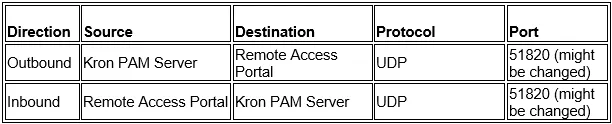
The firewall rules that must be configured on the network-level firewall protecting the network segment where the Kron PAM Server is deployed. These following rules apply to the network firewall in front of the Kron PAM Server, not to any host-based firewall running on the Kron PAM Server itself.
Required Firewall Rules on the Network Firewall Protecting the PAM Server
1) HTTPS Traffic from Remote Access Portal to PAM Server(TCP)
Allow the PAM Server to receive HTTPS traffic from the Remote Access Portal over the WireGuard tunnel.
2) WireGuard Tunnel Traffic from Portal (UDP)
Allow the PAM Server to communicate with the Remote Access Portal over WireGuard.
***Stateful Network Firewall (Recommended and Most Common)
Stateful firewall examples include enterprise and cloud firewalls such as Palo Alto Networks, FortiGate, Check Point, Cisco ASA/FTD, Juniper SRX, and AWS Security Groups.
Required Rule:

*** Stateless Network Firewall
In stateless firewall environments, traffic is evaluated per packet and connection state is not tracked.
Required Rules:
5. Download the Kron PAM server’s installation script on the Kron PAM server. The support team can provide the installation script. After downloading the script, unzip the Kron PAM server’s installation script on the Kron PAM server. You can use the unzip command to extract the files from the downloaded archive.
Linux CLI | [root@kron~]# unzip RAP_ONPAM-1.4.0.zip |
|---|
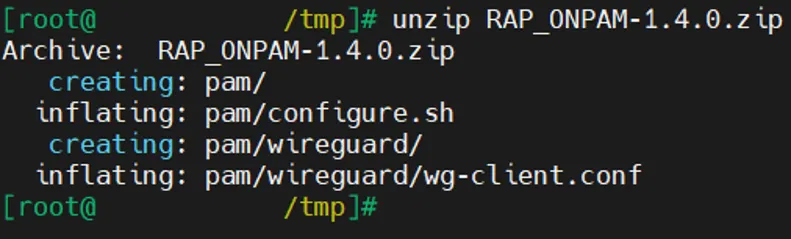
In case bash: unzip: command not found error is shown, install the unzip package with the sudo dnf install -y unzip command.
If somehow the user needs to start the script again (maybe, because of the wrong input or missing file etc…), please remove all installation files except for compressed Kron PAM Server’s installation script file and unzip the compressed installation script file again. After this you can execute the script.
We highly recommend this method, since the extracted files might be modified after the script execution for the first time and keep executing the script with modified files might cause a problematic installation!
6. Navigate to the pam directory:
Linux CLI | [root@kron~]# cd pam / |
|---|

7. Run the configuration script:
Linux CLI | [root@pam~]# sh configure.sh |
|---|

In case you need to set script permissions to execute it, you need to run chmod +x configure.sh command.
You need root privileges to run this script.
8. The Kron PAM server’s installation script asks user either:
a. For the first-time installation on the Kron PAM server, the Wireguard configuration on the Kron PAM server should be configured from scratch, thus, the first option should be selected by entering 1 and pressing the enter key.

The Kron PAM server’s installation script asks several configuration details:
o The Wireguard IP address that will be assigned to Kron PAM server’s side,
o AWS public IP address of Remote Access Portal (RAP) environment,
o The port number of Wireguard,
o The IP segment of Wireguard,
o A public key generated by the Remote Access Portal (RAP)’s script.
Description | Example Values |
|---|---|
Wireguard IP address that will be assigned to the Kron PAM server’s side | 10.0.0.2 |
AWS public IP address of Remote Access Portal (RAP) environment | 107.22.27.29 |
The port number of Wireguard | 51820 |
The IP segment of Wireguard | 10.0.0.0/29 |
Wireguard IP address assigned to the Remote Access Portal | 10.0.0.1 |
A public key generated by the Remote Access Portal (RAP)’s script | 9lbf3TZEr8t3rEShOtftB+SrqD5JrQa0JhDNBIzKVFA= |
After every information field is filled in, press y to continue. If you fail to fill in every information successfully (either missing or wrong info), press n to reenter information again.
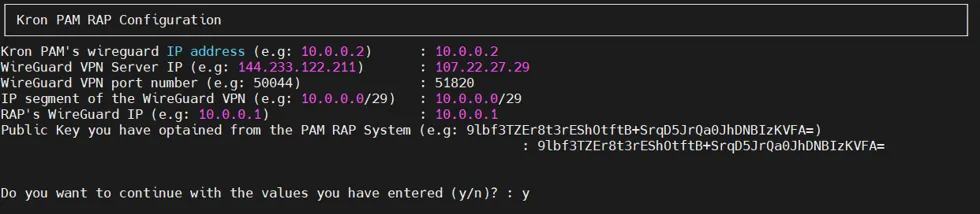
Once the Kron PAM server’s installation script asks the user to enter the public key, if the user doesn’t know the public key generated by the Remote Access Portal (RAP)’s installation script yet, the user can set temporary public key for now
(e.g., 9lbf3TZEr8t3rEShOtftB+SrqD5JrQa0JhDNBIzKVFA=).
But please do not forget to set the public key by using the Kron PAM server’s installation script (please check 7.b at the section below), after the Remote Access Portal (RAP)’s installationscript generates a public key.

At the end of Kron PAM server’s installation script, the public key generated by this script is ready to use on the Remote Access Portal (RAP) environment
(e.g., ha3Ebu4klPhPtxk86b+LEGMq6MGQYIcpk+UMg1EZyD8=).
Please do not forget to add this info on the Remote Access Portal (RAP) environment by using Remote Access Portal (RAP)’s installation script (Remote Access Portal (RAP) Configuration).
b. Once the Kron PAM server’s Wireguard configuration has been fully installed, only one configuration is missing here regarding public key that would be generated by the Remote Access Portal (RAP)’s installation script. If the user executes the Remote Access Portal (RAP)’s installation script on the cloud (please, check 6.a at the Section-4.2), it generates a public key which would be used in the Kron PAM server here, thus now this option can configure the secure tunnel configuration file with the generated public key from Remote Access Portal (RAP)’s side.
Select the second option by entering 2 and pressing the enter key.

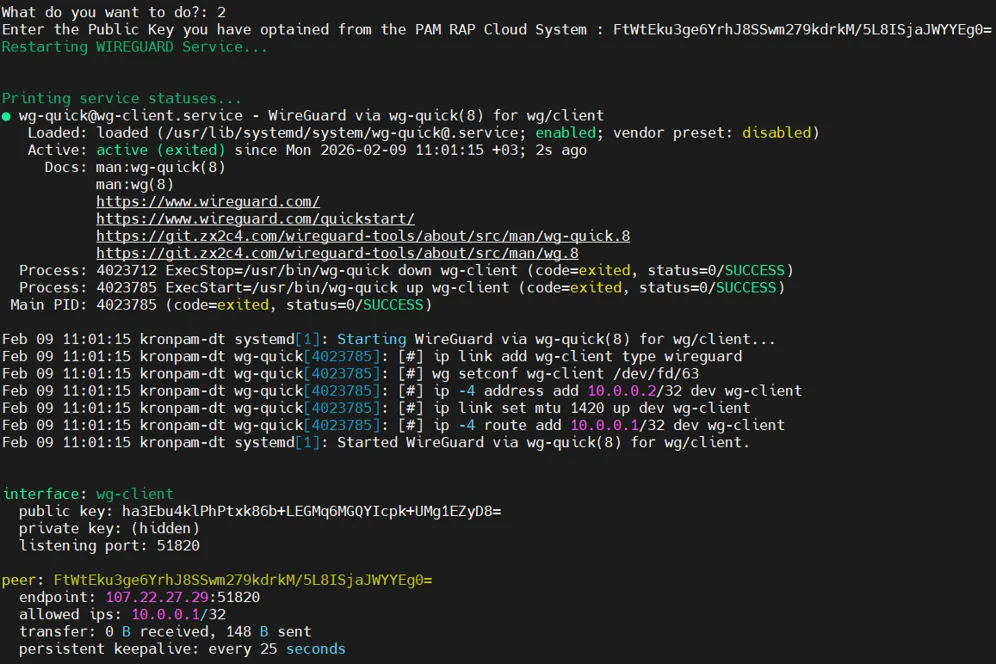
Set the public key data of the secure tunnel configuration file with a public key generated by the Remote Access Portal’s script
(e.g., FtWtEku3ge6YrhJ8SSwm279kdrkM/5L8ISjaJWYYEg0=).