Remote Access Portal (RAP) Configuration
The following steps should be read carefully to successfully install Remote Access Portal (RAP) on the regarding machine:
Prerequisite
Check the Secure Reboot Enabled status before the installation by running the mokutil --sb-state command.
If Secure Boot is enabled, it might cause an error during the Wireguard installation. Please disable it to continue the installation!
The firewall rules that must be configured on the network-level firewall protecting the network segment where the Remote Access Portal is deployed (for example: perimeter firewall, DMZ firewall, cloud network firewall). These following rules apply to the network firewall in front of the Remote Access Portal, not to any host-based firewall running on the Remote Access Portal server itself.
Required Firewall Rules on the Network Firewall Protecting the Remote Access Portal
1) HTTPS Access from External Users (TCP)
Allow external users to access the Remote Access Portal web interface.
2) WireGuard Tunnel Traffic (UDP)
Allow the Remote Access Portal (server) to establish a WireGuard tunnel with the PAM Server (client).
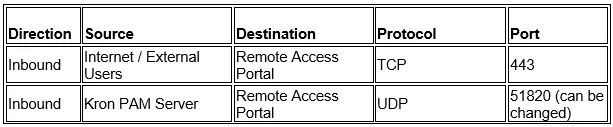
***Stateful Network Firewall (Recommended and Most Common)
Stateful firewall examples include enterprise and cloud firewalls such as Palo Alto Networks, FortiGate, Check Point, Cisco ASA/FTD, Juniper SRX, and AWS Security Groups.
Required Rule:
***Stateless Network Firewall
In stateless firewall environments, traffic is evaluated per packet and connection state is not tracked.
Required Rules:
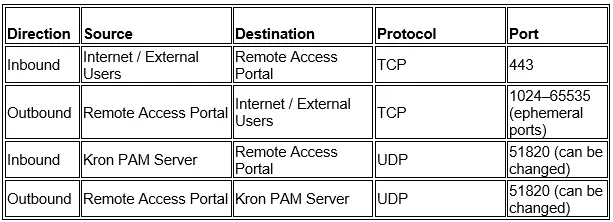
Note: Port 7777 is strictly internal to the Remote Access Portal server and must never be exposed on the network firewall.
1. Download the Remote Access Portal (RAP)’s installation script on the machine that will be used for Remote Access Portal (RAP). The support team can provide the installation script. After downloading the script, unzip the installation script on the machine. The user can use unzip command to extract the files from the installation script file.
Linux CLI | [root@rap~]# unzip RAP_MTC_CLOUD-1.4.0.zip |
|---|
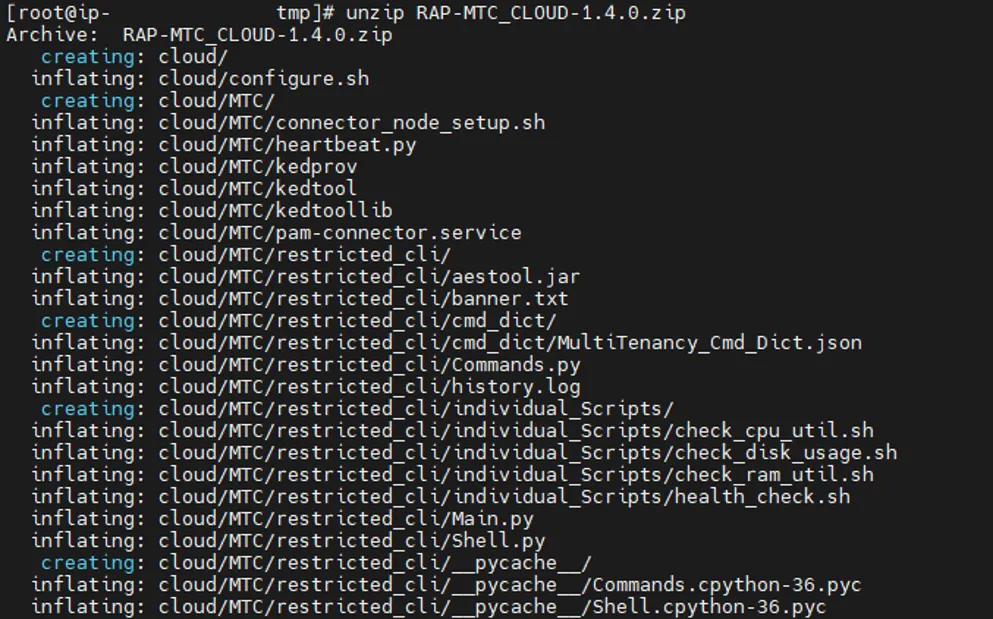
In case bash: unzip: command not found error is shown, the unzip package should be installed with the sudo dnf install -y unzip command.
If it becomes necessary to restart the script (because of a wrong input or missing file etc…), please remove all installation files except for compressed Remote Access Portal (RAP)’s installation script file and unzip the compressed installation script file again. After this you can execute the script.
We highly recommend this method since the extracted files might be modified after the script execution for the first time, and executing the script with modified files might cause the problematic installation!
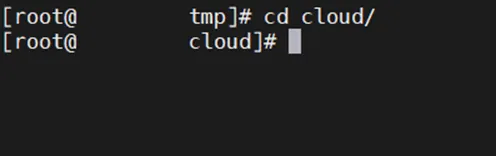
2. Navigate to the cloud directory:
Linux CLI | [root@rap~]# cd cloud/ |
|---|
3. Run the configuration script:
Linux CLI | [root@cloud~]# sh configure.sh |
|---|
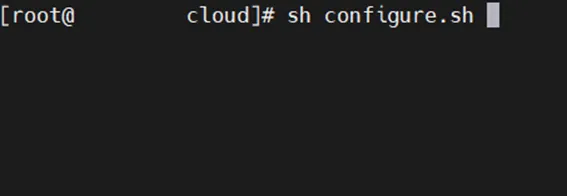
If you cannot run the script because of insufficient file permissions, run the chmod +x configure.sh command.
You need root privileges to run this script.
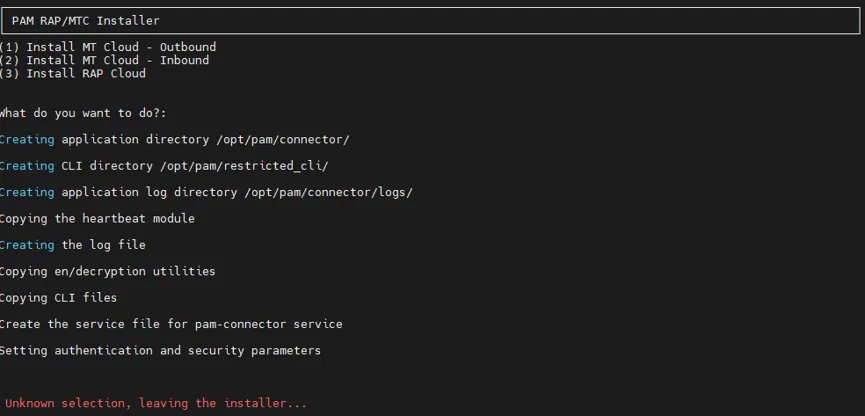
4. The Remote Access Portal (RAP)’s installation script should be restarted after the forced reboot. The installation script asks user either to install MT Outbound Connector, or to install MT Inbound Connector, or to install Remote Access Portal (RAP) module on the cloud. (the PAM side is installed on prem by means of the Kron PAM server’s installation script (e.g., RAP-ONPAM-1.4.0.zip))
You can safely ignore the following warning messages during the installation, as they do not block the whole installation.

5. To continue with Remote Access Portal (RAP) installation, select the third option by entering 3 and pressing the enter key.

In case accidentally pressing enter key without selection, the installation script causes a following error. But it is not a big deal, you can restart the installation script by executing sh configure.sh command again.
6. The Remote Access Portal (RAP)’s installation script asks either:
a. For the first-time installation on the cloud, the whole Remote Access Portal (RAP) system should be configured from scratch, thus, the first option should be selected by entering 1 and pressing the enter key.

During installation, the user is asked to choose between Normal Scenario and Failover Scenario for RPAM.
Normal Scenario: The Remote Access Portal establishes the WireGuard tunnel to a single Kron PAM Server. If the tunnel becomes unavailable, access is interrupted until the connection is restored. (1)
Failover Scenario: The Remote Access Portal is configured with a primary and a backup Kron PAM Server. If the WireGuard tunnel to the primary Kron PAM Server goes down, traffic is automatically redirected to the backup Kron PAM Server. (2)

The Remote Access Portal (RAP)’s installation script asks several configuration details:
o The Remote Access Portal (RAP) hostname,
o The port number of Wireguard,
o The IP segment of Wireguard,
o The Wireguard IP address that will be assigned to Remote Access Portal (RAP) environment,
o The Wireguard IP address that will be assigned to Kron PAM server environment (In the failover scenario, there are two inputs for the Kron PAM Servers’ wireguard IP addresses.),
o A public key generated by the Kron PAM server’s installation script.
Portal Configuration Descriptions | Example Values |
|---|---|
Remote Access Portal (RAP) hostname | https://rap.company.com |
Port Number of the Wireguard | 51820 |
IP segment of the Wireguard | 10.0.0.0/29 |
Wireguard IP address assigned to the Remote Access Portal (RAP)’s side | 10.0.0.1 |
Wireguard IP address assigned to the Kron PAM server’s side | 10.0.0.2 |
(For Failover Scenario) Wireguard IP address assigned to the Backup Kron PAM Server | 10.0.0.3 |
Public Key generated by the Kron PAM server’s installation script | Hye1Ob+eGWbkRiBGWzPq8neiAkE7egV8Iwt811T69Eg= |
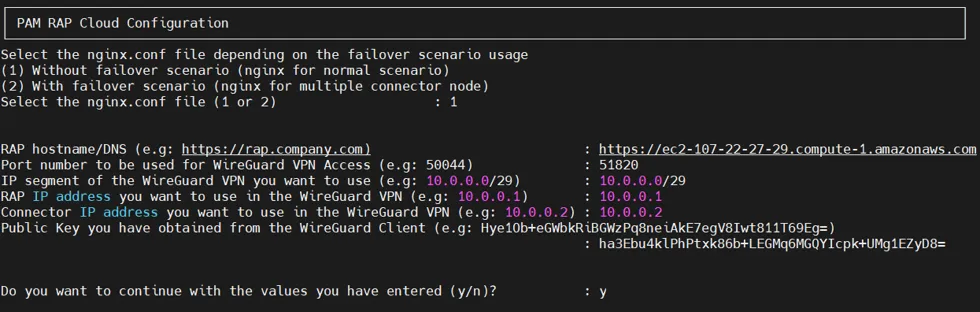
After all the information is filled in, press y to continue. If you fail to fill in every information successfully (either missing or wrong info), press n to reenter information again.
Once the Remote Access Portal (RAP)’s installation script asks the user to enter the public key, if the user doesn’t know the public key generated by the Kron PAM server’s installation script yet, the user can set temporary public key for now (e.g., ha3Ebu4klPhPtxk86b+LEGMq6MGQYIcpk+UMg1EZyD8=).
But please do not forget to set the public key by using the Remote Access Portal’s installation script (please check 6.b below), after the Kron PAM server’s installation script generates a public key.
During installation, choose the target PAM version to download the proper RAP jar file.

At the end of Remote Access Portal (RAP)’s installation script, the public key generated by this script is ready to use on the Kron PAM server (on-prem) environment
(e.g., FtWtEku3ge6YrhJ8SSwm279kdrkM/5L8ISjaJWYYEg0=).

Please do not forget to add this info on the Kron PAM server environment by using Kron PAM server’s installation script (Kron PAM Server Configuration).
In the last step here to change self-signed certificate and generic RSA private key with the user’s own certificate and RSA private key. The user should remove the self-signed certificate and generic RSA private key on /etc/nginx/certs directory. After this, the user should add the user’s AWS certificate and RSA private key with the same names. Lastly, the user should restart nginx service by using sudo systemctl restart nginx.service command.
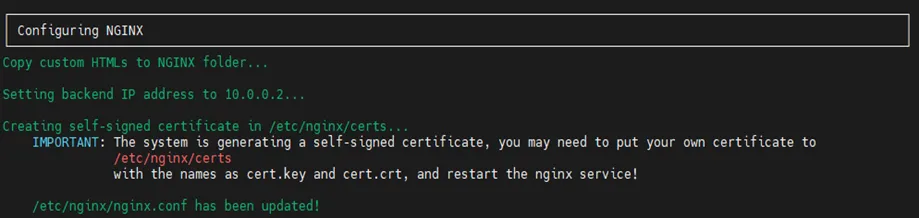
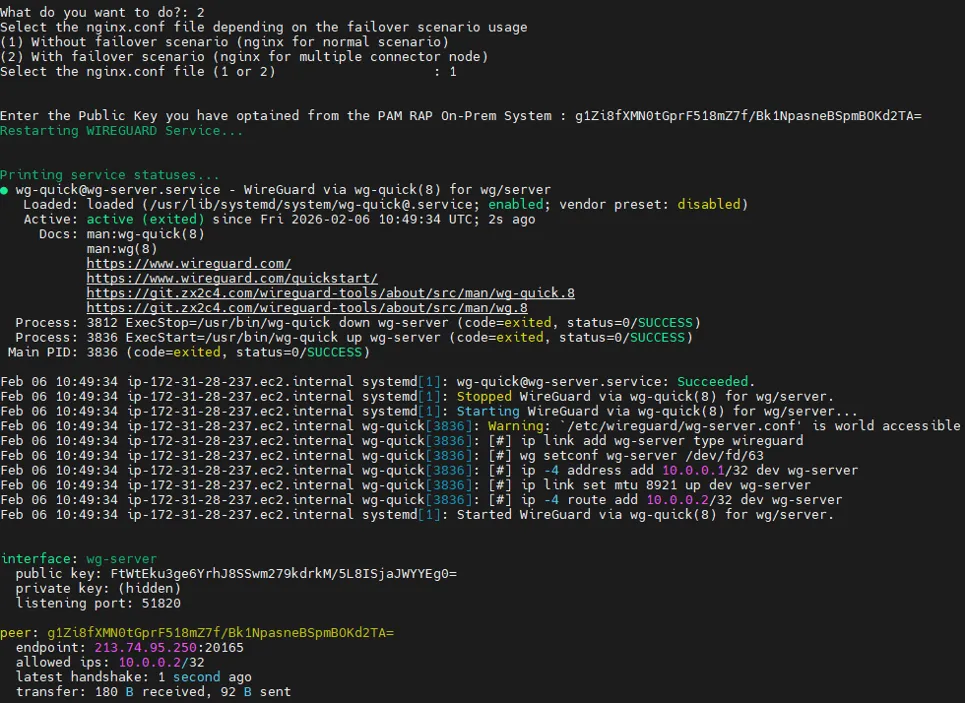
a. Once the Remote Access Portal (RAP) has been fully installed, only one configuration is missing here regarding public key that would be generated by the Kron PAM server’s installation script. If the user executes the Kron PAM server’s installation script on premise (Kron PAM Server Configuration), it generates a public key which would be used in the Remote Access Portal (RAP) here, thus now this option can configure the secure tunnel configuration file with the generated public key from Kron PAM server’s side.
The user should select the second option by entering 2 and pressing the enter key.

During installation, the user is asked to choose between Normal Scenario and Failover Scenario for RPAM.
Normal Scenario:The Remote Access Portal establishes the WireGuard tunnel to a single Kron PAM Server. If the tunnel becomes unavailable, access is interrupted until the connection is restored. (1)
Failover Scenario:The Remote Access Portal is configured with a primary and a backup Kron PAM Server. If the WireGuard tunnel to the primary Kron PAM Server goes down, traffic is automatically redirected to the backup Kron PAM Server. (2)

Set the public key data of the secure tunnel configuration file with a public key generated by the Kron PAM server’s installation script
(e.g., g1Zi8fXMN0tGprF518mZ7f/Bk1NpasneBSpmBOKd2TA=).