Uploading Kron PAM Extension to OpenText UCMDB
Uploading the Kron PAM extension to UCMDB is a critical step in enabling a secure, automated flow of credentials from Kron PAM’s Password Vault to UCMDB’s discovery processes. By installing this extension, you provide UCMDB with the necessary functionality to fetch privileged passwords directly from Kron PAM, ensuring that all discovery and scanning activities use up-to-date, securely managed credentials. This step lays the groundwork for a fully integrated, compliant, and efficient credential management workflow between the two platforms. To upload the Kron PAM extension to OpenText UCMDB, follow the steps below.
- Log in to the UCMDB web user interface with administrative credentials.
- Navigate to Administration > Package Manager menu.
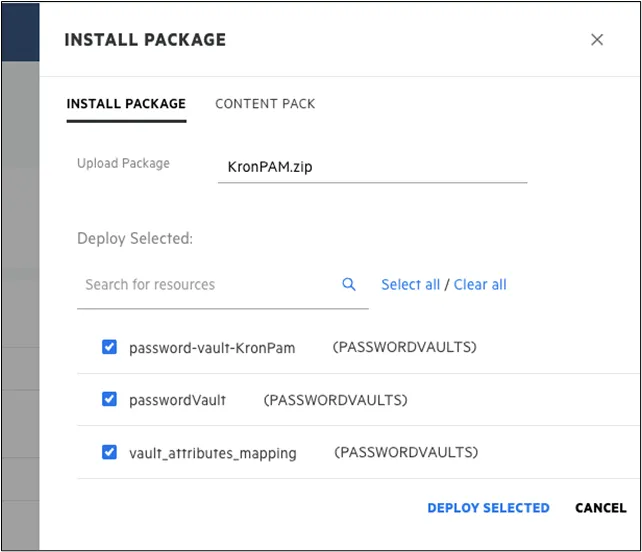
- Click the Install Package button.
- Select the KronPAM.zip file, and select files to upload.
- Click the Deploy Selected button.
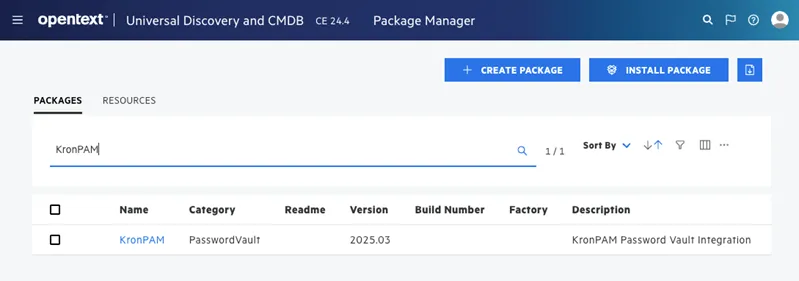
- Check uploaded packages.
Enable the password vault integration from UCMDB Web UI. The Kron PAM extension needs to be enabled on the UCMDB Web UI. To do this:
- In UCMDB Web UI, click the UD/UCMDB Modules menu.
- Navigate to the Administration > Infrastructure Settings Management module.
- Locate the List of external vault types infrastructure setting and enter the provider name in the Value field: Kron PAM
- Click Save. The change is synchronized to all connected probes.