Configuring UCMDB Credentials
1 min
Configuring UCMDB credentials on the UCMDB UI is the final link in the chain that enables UCMDB to securely use Kron PAM’s managed credentials for discovery. By properly setting up these credentials within the UCMDB interface, you ensure that all discovery activities leverage the correct, up-to-date passwords without exposing them directly, thus maintaining the highest standards of security and compliance. To configure UCMDB to use credentials fetched from Kron PAM:
- Log in to the UCMDB web user interface with administrative credentials.
- Navigate to the Probe Setup menu and open the Credentials tab.
- Click the Add button to create a new credential configuration.
- Fill in the protocol, port, and authentication method fields
- Add Password Vault account configuration.
- When configuring credentials in UCMDB, it is important to specify the account in the following format: accountname@account_full_path.
- For example, if you are configuring an account named "testaccount" within UCMDB Vault Group, it should be entered as “testaccount@/UCMDB”:
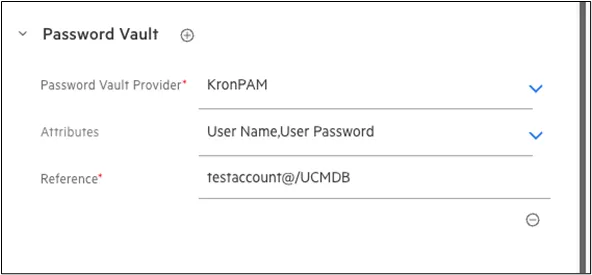
Adding credential configuration