Configuring the Kron PAM Extension Before Uploading to UCMDB
Kron PAM extension package according to the standard guidelines provided by OpenText.
- Unzip the Kron PAM extension package.
- Navigate passwordVaults and then the Kron PAM folder.
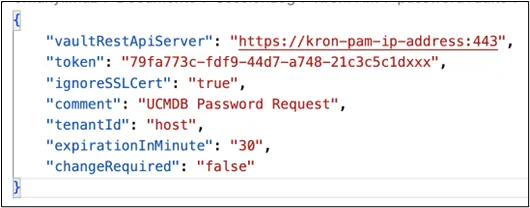
- Open the passwordVault.json file with a text editor.
- Edit the file with proper values and then save it.
- Then zip the files again to re-pack the extension package.
Configuration Parameter | Description |
|---|---|
vaultRestApiServer | The URL for accessing the Kron PAM Password Vault’s REST API. This should be the fully qualified domain name or IP address along with the correct protocol (e.g., https://pam.example.com). |
token | The Application Token obtained from Kron PAM. This token authenticates and authorizes requests to the Password Vault. |
ignoreSSLCert | A boolean parameter indicating whether SSL certificate validation should be bypassed. Set to true in test environments where certificates might be self-signed, and false in production environments for strict SSL validation. |
comment | A text field that can be used to store notes about the credential requests. This note will be logged by Kron PAM. |
tenantId | If Kron PAM is deployed in a multi-tenant environment, this parameter specifies the unique tenant identifier. It ensures that credentials and operations are correctly scoped to the appropriate tenant. If there is a single tenant installation, it should be configured as “host” |
expirationInMinute | The time period (in minutes) after which the password is considered expired. Kron PAM can rotate or invalidate credentials once this threshold is reached, enhancing security by reducing the window of exposure. |
changeRequired | A boolean parameter that, when set to true, indicates the password must be changed (or rotated) before password retrieval. |