Using HTTP Proxy in SSL/TLS Mode
1 min
If SSL is enabled on the HTTP Proxy, you must configure the Kron PAM Desktop Client with the correct SSL parameters on the HTTP Proxy tab.
- Open the Kron PAM Desktop Client and click Connections on the Login screen.
- Select the server from the list and click Edit.
- Open the HTTP Proxy tab and apply the correct SSL parameters. Change the port number if the proxy port is different from the default port (7080).
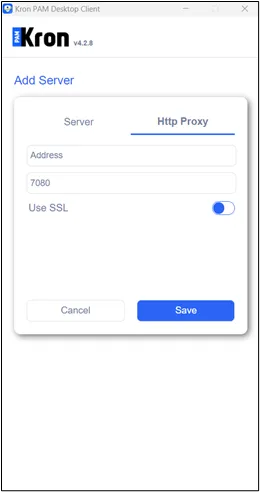
When SSL is enabled, enter the correct SSL parameters from the HTTP Proxy tab.
HTTP Proxy address selected on the Desktop Client should be identical to http.proxy.host parameter defined under /pam/http/conf/http_proxy.properties. For instance, if the Http Proxy address is set as domain name, and http.proxy.host on the http_proxy.properties is set as IP address, once the http proxy service is used on the Desktop Client, user faces the blank screen!