RADIUS 802.1x Configuration
2 min
If you use Kron PAM for 802.1x RADIUS Authentication Services, configure the settings below:
- Obtain the authentication server CA certificate.
- Create a network profile via the manual connection wizard:
- Select the Security Type as WPA2 Enterprise.
- Select the Encryption as AES.
- Select the Authentication Method as PEAP.
- To adjust the PEAP Properties:
- Check the Verify the server’s identity by validating the certificate box.
- Select the CA certificate of the authentication.
- Select the Authentication Method as MSCHAPv2
Sample Configuration for Linux
- Obtain the CA certificate of the authentication server.
- Create a network profile via the manual connection wizard:
- Select the Wi-Fi Security as WPA2 Enterprise.
- Select the Authentication as PEAP.
- To adjust the PEAP Properties:
- Select CA certificate of the authentication server.
- Select the InnerAuthentication as EAP-MSCHAPv2
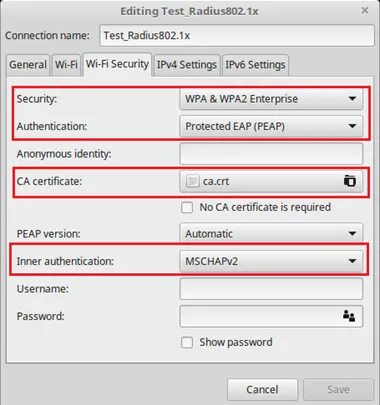
Manual Network Settings for Linux